Tampilkan postingan dengan label Technology Tutorials. Tampilkan semua postingan

Kamis, 06 Oktober 2011

Internet speed is very slow? How to fix it?

Sometime the internet speed become very slow. You make the speed to faster back.

First you need to check the internet speed by follow 3 steps below :
1) Click Start Menu, type cmd into the search box. Press "Enter" button on keyboard.
2) You will see a small black box appear. Type ping www.google.com -t into the black box.
3) Check the time=??ms :
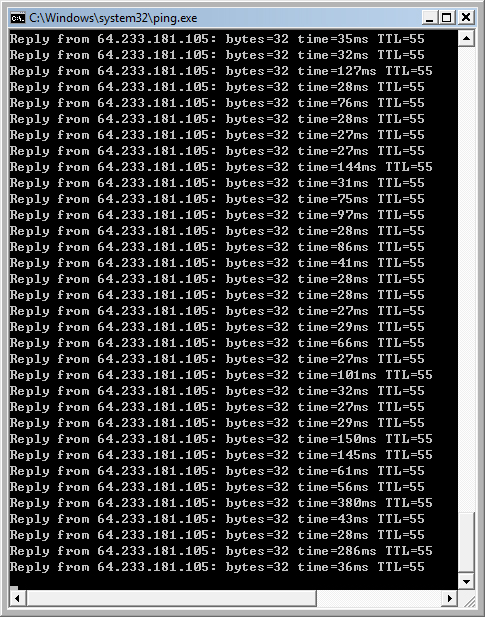
30ms = internet speed is very fast.
80ms = internet speed is fast.
300ms = internet speed is slow.
1000ms = internet speed is very slow.
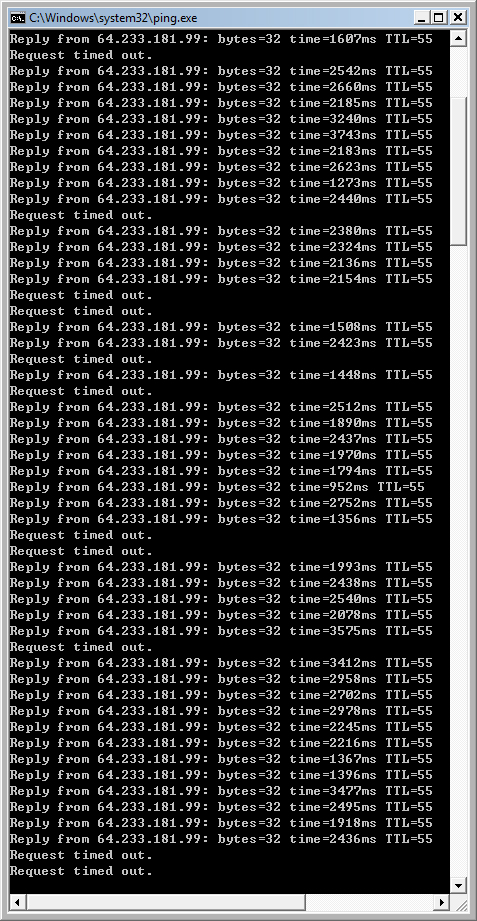
2000ms = internet speed is very very very slow.
Picture below show the internet speed is VERY VERY VERY SLOW :
Picture below show the internet speed is FAST:

If you see your ms is very high, it mean your internet speed is very slow, why it is slow? Sometime it is because some China movie player are downloading or uploading the movie files to other internet user, eg : PPStream, Qvod, Funshion, Xun Lei. You need to close those players application and process. Many people know how to close the application only, but they don't know how to close the process. If you didn't close the process, the process will slow down your internet. To close the application and process, there are two different ways (easy way and hard way) :1) easy way : you can download a file from http://2aek.com/inventory/offpps.bat. After finish download the file, you double click it to open and run it. When you open the file, u will see a black box appear for 1 or 2 seconds. The black box spend 1 or 2 seconds to close all application and process of PPStream, Qvod, Funshion, Xun Lei. Now you go check the speed ms by doing the 3 steps above again, see if the ms is still high or low? If the ms is still high, it mean other computer in your house didn't close the application or process of PPStream, Qvod, Funshion, Xun Lei yet. You need to send the offpps.bat file to all of computers in your house, then open to run it on all computers to close all application and process on all computers.

2) hard way : info at http://ye5.blogspot.com/2011/08/how-to-fully-exit-pps.html.

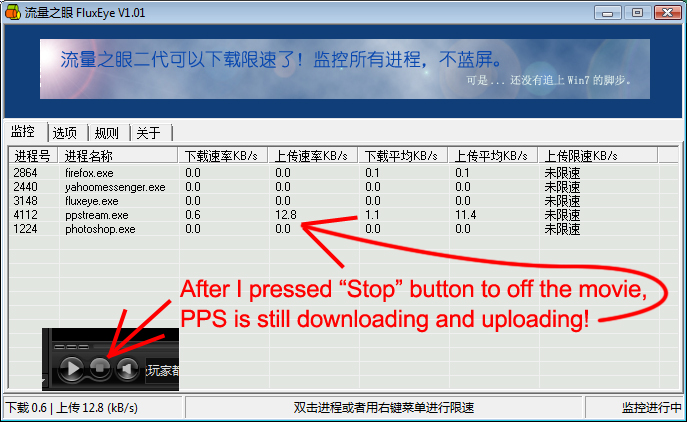
In addition, you can download a software name "fluxEye" to check what software on your computer are download / uploading files to the internet, so you can know what software are eating your internet speed. you can download "fluxEye" from http://2aek.com/inventory/donshare.rar or from http://cache.ourdev.cn/bbs_upload568426/files_10/ourdev_395773.rar. Then install it, then open it. (Tip : after you download the file, you need to open the file with 7zip or winzip or winrar).

Picture below shows the the screenshot of FluxEye :

After you close all application and process of PPStream, Qvod, Funshion, Xun Lei on all computers in your house, and after you use FluxEye to confirm there is no software is eating your internet speed, but the ms is still high or the speed is still slow, you must call streamyx to fix the line by follow the steps on this page : http://ye5.blogspot.com/2010/11/fix-my-streamyx-slow-connection-problem.html.

Rabu, 21 September 2011

Best websites / players / softwares to watch latest movies

Do you want to watch latest cinema movie online?
1) PPStream - http://www.ppstream.com
2) Funshion - http://www.funshion.com
3) Xun Lei - http://www.xunlei.com
4) QVOD - qvodsou.cc | 33md.cc | tom365.com
Comparison between them :
PPStream :
1) PPStream doesn't has latest movie an anymore, it has outdated movie only.
2) PPStream will slow down your internet speed when you are downloading movie. (Solution to avoid PPStream slow down your internet at HERE).
3) If you use software to limit PPStream uploading speed to 3kbps just to avoid it slow down your internet speed, its downloading speed also will be slowed down so much (movie downloading speed become extremely slow).

Funshion :
1) Funshion has many latest movies.
2) Funshion will not slow down your internet speed when you are downloading movie.
3) Some user facing problem about Funshion website loading very slow until they can't open it and can't download funshion player from it, the here is the solution http://ye5.blogspot.com/2011/09/cannot-open-funshion-website-loading.html

Xun Lei:
1) Xun Lei is a software to download movie, not a software to play movie, but the installer of Xun Lei comes with Kan Kan player.
2) You can't watch the movie when the movie is downloading unless you pause / stop the downloading. (You can download three movies at the same times, so when watch 1 of the movie, u can still downloading other 2 movies).
3) Xun Lei has many errors. For example, 错误代码:0x8004022F(-2147220945). You can fix this error by the following steps :
Step 1) Unistall Xun Lei completely. After uninstall it, go to delete all files and folder of Xun Lei in Computer > C drive > Program Files.
Step 2) Download latest version of Xun Lei from http://www.xunlei.com.
Step 3) Install it.
Step 4) Try to open it and use it to play movie to check whether or not the error is fixed.
Reference at http://zhidao.baidu.com/question/108361952.html.

QVOD :
There are two different versions of QVOD player, tom365.com | 33md.cc are using the same QVOD player, but qvodsou.cc using other version of QVOD player. So if you want to watch movies on all the websites, you need to install both versions of QVOD. qvodsou.cc has many latest movies. After installing QVOD player onto your compter, you need to open those website by Internet Explorer, then right click the Active-X plugin at top bar there, choose allow Active-X, then only you can start downloading the movie.


If you have installed all the players onto your computers, just like me. Some of the player will downloading / uploading the movies secretely behind the scene, they will slow down your internet. If you are facing internet slow problem, you want to exit all those players, you need to exit the player 1 by 1 and you need to press CTRL + ALT + DELETE to bring up Task Manager, search for the players' process, end the process... There are so many steps and very inconvenient that you need to spend time do all the steps repeat and repeat again everyday. So I have create a program to exit all of them in 1 click. To create the program, please follow the steps below :
1) Open a notepad.
2) type the following words into the notepad :
taskkill /f /im ppstream.exe
taskkill /f /im ppsap.exe
taskkill /f /im ppap.exe
taskkill /f /im qvodplayer.exe
taskkill /f /im qvodterminal.exe
taskkill /f /im funshion.exe
taskkill /f /im funshionservice.exe
taskkill /f /im thunder.exe
taskkill /f /im thunderplatform.exe

3) Save the notepad (Choose All Files (*.*) at "Save as type :" field. Then type exitPlayers.bat at "File Name :" field. Then Choose Desktop as the saving location.
4) Everytime you want to exits all the players, you just need to double click exitPlayers.bat icon on your desktop.

Selasa, 20 September 2011

Mobile phone connect to wifi but charge fee for gprs

When you are connecting your mobile phone or handphone to wifi or wlan, you still get charged fee for gprs when you are :
1) browsing the website.
2) downloading java games or application.
3) download android games or application.
4) playing games.

Why this happen? It is because you didn't change GPRS to WIFI / WLAN in profiles settings yet, There are many profiles settings to be set :
1) Java setting,
2) Java games setting,
3) Service setting,
4) Browser setting,
5) Android app default setting,
6) Android games setting.

Different phone has different setting location, I give u example for my phone below :
To set java games : select game > options > receiver > java sim1 profile > WLAN

To set safari browser : safari > setting > profile > WLAN

After set all things from GPRS to Wifi / WLAN, you can test it by the following steps :
1) You can go to reset your gprs counter to 0. The gprs counter is on Call History for some mobile phone.
2) Try to online browse some website / download games / play game.
3) Check gprs counter.

Note that gprs delay to charge the fee. Last time I was stupid enough, I used my mobile phone browse website, download games, play games, then I go check my phone credit balance, the balance is still the same, so I though I was using wifi, and not using gprs. But on the next day, I checked my phone credit balance again, OMG! It charged RM25 for gprs! So if you want to check gprs charge, don't check with your credit balance, you can check with gprs counter.

Senin, 19 September 2011

Cannot open funshion website loading slow

Funshion is so good but unfortunately some internet users might have some trouble to download Funshion player due to Funshion website server loading is too slow. If you are having this problem. Below is the solution steps :
1) Use Google DNS. The info of Google DNS at http://code.google.com/speed/public-dns/
2) Use Internet Explorer visit http://fs.funshion.com/download/.
3) Click on 新浪下载 to download Funshion player. If 新浪下载 server is too slow for u and fail to download it, then u should try click on 太平洋下载 or 腾讯下载 or ZOL下载 or 天空下载. You need to try 1 by 1 until you success download it. Be careful see the download button carefully, make sure you click the right button, see the picture below, most of people will click the first download button but it is actually a wrong button!!

4) If you have tried to download the player from all servers but none of them success, you can download it from my own hosting at http://2aek.com/inventory/funshion.exe which is 2.4.2.56 version only.

5) Install it.
6) Click "Play" button on the movie that you want to watch.

Sabtu, 17 September 2011

Computer cannot connect to wireless network until restart the computer

Do you face this problem? When your computer is connecting to wireless network, suddenly it disconnected and cannot connect it back until you restart the computer. Actually you don't need to restart your computer:

If your computer can't find / can't detect / can't search / can't connect the wireless network, you can try to unplug the wireless adapter, then plug it to other usb port, then connect your computer to wirefless network.

If your computer can connect to wireless network, but cannot surf the internet, cannot browse website, then do the 5 steps below :
1) Right click on wireless icon,
2) Choose "Diagnose and Repair",
3) Choose "Restart DHCP".
4) It will take 10 seconds to restart DHCP,
5) Then you go to connect wireless again, it should work.

One of my friend said that when her laptop disconnected from wireless network, she was in the middle of something important so she cannot restart the computer, she need internet connection to save her works. She said she waited for 30 minutes later then only her laptop can connect back to the wireless network. So conclusion is there are 3 different solutions to solve this problem :
1) Restart computer / laptop,
2) Restart DHCP,
3) Wait for 30 minutes.
Obviously solution number 2 (Restart DHCP) is better than all of other.

Kamis, 15 September 2011

Windows Vista / 7 / iphone cannot connect to wireless network which has password security? Resolved!

It is hard to connect wireless network that has password security on windows vista and windows 7 and iphone4.

For windows xp, just double click to connect the wireless, then type password can d, but for windows vista/7/iphone is NOT that easy!!!,

For windows Vista or 7, right click the wireless icon, then :
1) click "Network and Sharing Center"
2) click "Manage Wireless Network"
3) Right click the network and choose "properties"
4) click "Security"
5) choose "open", "WEP", type password, click OK.

For iphone 4, need to set access point settings : "open", "WEP, type password. Then connect the wireless network through the access point that you have created just now.

Jumat, 26 Agustus 2011

Block computers in the same network open PPS

If there are 2 or more computers are sharing a modem or wireless router, if 1 of them open PPS, all other computer will suffer for internet slow speed. You can block pps by your wireless router, so none of computers can use pps, so your internet speed won't be slowed down. First, you need to have the router's login password.
Just block the following ports for both of TCP & UDP.
64430
17788
1900 *
8400
3478 *
8800 *
7201 *
7202 *
You can choose not block this ports above which have the sign of * because PPStream is more depends on port 17788, 8400 & 64430 only.


My router is Dlink Di-524, with an original firmware


PPS is buffering...


Block the PPS Servers' ports


Now try to watch another movie, makes it reconnects to the server


Now, PPS failed on connecting to its server!

Tested on 2 pcs, which installed of the latest of PPS and they failed to stream the movie now.

Note that new version of ppstream is using different ports, you need to check what ports are it using.

Reference : http://forum.lowyat.net/topic/1261419

You might also like : How to fully exit PPS? | PPstream Slow Down Internet - Fixed

Last Updated on 27 August, 2011

How to fully exit PPS?

Do you realize that your internet is still slow after u close your PPS? It is because your PPS is still uploading and downloading the movie after you close PPS software, because you didn't close the PPS process yet. To close the process, follow the steps below :
1)press CTRL + ALT + Delete to open Task Manager,
2)click Process on top menu,
3)click Image Name to sort the name from A to Z (just for easy to find where is pps)
4)find PPSAP.exe then click it to select it,
5)click End Process.


If you feel it is inconvenient as you need to do the 5 steps above repeatedly everytime you want to off PPS. You can follow the step below to create a program :
1)open a notpad file,
2)type Taskkill /im ppsap.EXE /F onto the notpad,
3)press CTRL + S
4)change the field of Save as type: to All Files(*.*),
5)type offpps.bat on the field of File name:,
6)Choose location Desktop (To save the notepad file on your desktop).

If you want to close ppstream.exe, ppsap.exe and ppap.exe at the same time, you can modify step 2 above by typing :
taskkill /f /im ppstream.exe
taskkill /f /im ppsap.exe
taskkill /f /im ppap.exe


I have create 1 for myself, you can download it from http://2aek.com/inventory/offpps.bat.

Now everytime you want to off pps, you just need to double click the program that u have created. So convenient!


Many people misunderstand that after pressed “Stop” button to off the movie, then PPS will stop downloading, actually pps will still continue downloading and uploading!!!


To check whether or not your PPS is stop uploading and downloading, you can download a software from http://2aek.com/inventory/donshare.rar or from http://cache.ourdev.cn/bbs_upload568426/files_10/ourdev_395773.rar. Then install it, then open it. (Tip : after you download the file, you need to open the file with 7zip or winzip or winrar).

You might also like : PPstream Slow Down Internet - Fixed | Block computers in the same network open PPS

Selasa, 21 Juni 2011

Format PC in 20 minutes! Super Fast!

Normally people format a computer need to take about 3 to 5 hours because they need to redownload drivers and softwares, and need to reinstall the softwares.

Actually we can skip all steps by using a software call Acronis. Basically you just need to copy your entire c drive and paste it into a external harddisk. So next time when you format your computer, you can copy the c drive from external harddisk to your computer harddisk, so you don't need to resintall all the drivers and softwares.

Step 1 - Format ur pc (jz to make sure no virus and rubbish).
Step 2 - Install all drivers and softwares.
Step 3 - Test to use all software (make sure no error, and no virus, make sure everything is okay).
Step 4 - Download and install Acronis free trial version.
Step 5 - Open Acronis, insert an empty cd, click "make bootable media". It will burn some data into the empty cd.
Step 6 - Take out the cd. Plug in External Harddisk. Open Acronis, click "Backup partition", follow the process to backup your c drive into External Harddisk.

Next time when you want to format your computer, follow the steps below :
Step 1 - Insert windows cd (vista/xp/7), delete all partitions (c drive & d drive). DO NOT create new partitions, and DO NOT format partition yet.

Step 2 - take out windows cd, and insert Acronis bootable media cd.
Step 3 - Restart Computer, it will boot into Acronish software.
Step 4 - Click "Create New Partition" to create a new partition, it will be your C drive.
Step 5 - Click "Restore a Partition" to copy the old c drive from your external harddisk to your current fresh new partition.

Step 6 - Wait for 15 to 30 minutes to let it finish copying. Then take out the cd and WOW!! You got everything back. Now you just need to upgrade those outdated software like msn messenger, firefox browser...

Selasa, 15 Maret 2011

How to faster Facebook loading speed?

If you are having difficulty accessing facebook. Why Facebook slow? It is because of the earthquake in Japan on 11 March 2011 damaged the cable that link Malaysia to Hongkong to USA. Click here for more info.

Solution :
You can force your computer to use another Malaysia ISP ip address 203.106.85.66 to load your facebook faster. You just need to follow the step below :
1. Go to C:\Windows\System32\drivers\etc\
2. Open "hosts" file with notepad
3. Add 203.106.85.66 www.facebook.com onto the notepad.
4. Save.
5. Close your browser. (Press CTRL + ALT + Delete button on your keyboard to bring up Task Manager, select Firefox or Chrome or IE, then click "End Task").
6. Open your browser, sign in facebook.com
7. Enjoy the superfast loading speed of facebook.com! YEAH!

If you cannot edit or cannot save the "hosts" file, here is the solution :

1 - When you open the "hosts" file with notepad, if you are getting errors,
go to Start –> Control Panel –> User Accounts -> Click Change User Account Control Settings -> Set to Never Notify. Save Settings and Restart PC. Then you should be able to edit your hosts file now.

2 - Windows XP, open notepad, copy paste the above text on how hosts should look like. Save as, remove the change the Text Document to all files. Save without the .txt. Delete the current hosts file and overwrite with a newly created one.

3 - U need to login administrative account on your windows then only can edit or save.

4 - If you have UAC turned on, kindly turn it off. More info at http://www.petri.co.il/disable_uac_in_windows_vista.htm

If you cannot login your Facebook account after you have added the ip address to the "hosts" file.
Please try 2 solutions below :
1 - It is because the date and time of your computer is incorrect, you need go to your computer date and time there, click "update" button to update the time. You need to go deep deep deep of the time setting until u see "update" button. For me with Vista, I click the time > change data and time setting > internet time > change setting > "update" button.

Facebook SSL Error – akamai.net
When you are trying to log in to your Facebook account but an error message appear like below :
This is probably not the site you are looking for!
You attempted to reach www.facebook.com, but instead you actually reached a server identifying itself as a248.e.akamai.net. This may be caused by a misconfiguration on the server or by something more serious. An attacker on your network could be trying to get you to visit a fake (and potentially harmful) version of www.facebook.com. You should not proceed.

Proceed / Go back to safety

Or if you see the error message like picture below :If you saw the error message above, please don't scare and don't worry, it is not hacker or virus. It is just SSL certificate error. I have seen this on and off when trying to log in from home. I have tried researching to find the cause, but I haven’t found a good explanation yet. But I have tried the following when this happens, and it seems to fix the issue almost always:

If you are on Windows, open a Command Window, and type ipconfig /flushdns. (On Unix/Linux systems, run ifconfig.)
Then, go back to your internet browser and clear the cache. For example, in Google Chrome, click on the wrench symbol on the top right and select Options. Next, click on Under the Hood, followed by Clear browsing data... In the pop-up window, select Obliterate items from the beginning of time and make sure that Empty the cache is selected. Finally click Clear browsing data.
That’s it! You should be able to log in to Facebook now.

You can test your facebook.com loading speed by the following steps :
1 - Click Start > Type cmd in the search box, type ping www.facebook.com -t into the small black box then press enter button on keyboard. You will see the ms speed, ms = milliseconds, if you see 50ms, it mean your internet spend 50ms to transfer the data from facebook server to your computer. 50ms is very fast!!! If you see 400ms, it mean your facebook loading speed is very slow.

Here is the result of my ping test before and after I add the ip address to the "hosts" file.
Before adding the ip address to the "hosts" file :


After adding the ip addres to the "host" file :


Last Updated on 16 November, 2011

Kamis, 24 Februari 2011

Paypal Fail To Send Payment By Maybank Debit Card


After you link your Maybank Treats Smart Shopping Visa debit card to your Paypal, when you are about sending payment to other's paypal account by using your debit card, if Paypal shows any error messages below :
1) Please finish the card confirmation process first, then try this payment again. This error occur is because you recently edit/update the info of your card, so Paypal need a day to review your card. For my case, this error is fixed on the next morning I woke up.

2) This payment cannot be completed because your credit card has been declined by your credit card issuer. To fix this error, you need to follow the steps below :
Step 1 - Go to ATM machine change the limit of Withdrawing, Transferring, and Selling to RM5000 (The default limit is RM500 only). You insert your ATM card into the ATM machine, then type in your password, then press Other/Lain-lain > Change limit/language/had/bahasa > Then you will see the 3 options : Withdrawing, Transferring, Selling. Select them 1 by 1 to change their limit to RM5000.

Step 2 - Go home use your computer login to http://www.maybank2u.com.my website, then look under "Utilities" and click on "Maybankcard Secure Online Shopping Registration" :
Then select which card you want to use. Then create a new MSOS Password (You must always remember this password because you need to enter this password everytime you send money by using your PayPal). Then fill in the Personal Assurance Message. Then fill in the Expired Date of your card, CVV of your card, Hint & Answer.

Step 3 - Log out your Paypal account from Paypal website, then login your Paypal account again and try to send the payment to the seller/ other people again.

That's all. Hopefully you will be able to send payment in Paypal by using Maybank Debit card after fix the two errors above. Good luck.

If you want to know how to link your Maybank debit card to your Paypal account, you can go to http://ki5.blogspot.com/2010/07/frequently-asked-questions.html then click Question 7.

Selasa, 22 Februari 2011

External Hard Disk suddenly cannot open - Fixed

Your external hard disk was working very good all the times but suddenly you can't open it anymore, when you are trying to open it, it give the error message "You need to format disk in drive before you can use it", and your hard disk is 0 byte, means there is no file inside the hard disk. Means all the data inside the hard disk are gone!!!

Reason :
1) The external hard disk lost power while you are copying a file onto it.
2) The external hard disk usb cable was unplugged while transferring data.

Solution :
Please follow the steps at below :
1) Click the Safely Remove Hardware icon at the bottom right corner near the clock/time area on your desktop to safely remove your external hard disk.

2) Off the power supply of your external hard disk.
3) Unplug the usb cable of your external hard disk from your computer.
4) On the power supply, replug in the usb cable.
5) You will see the error message, Please Cancel it. (DON'T click Okay/Format/Whatever, click the X if necessary).
6) Click the Start button
7) Go to Accessories
8) Click Command Prompt
9) Type chkdsk e: /f (if your external hard disk drive is Drive E)... Replace the e letter if your external hard disk is not drive e.

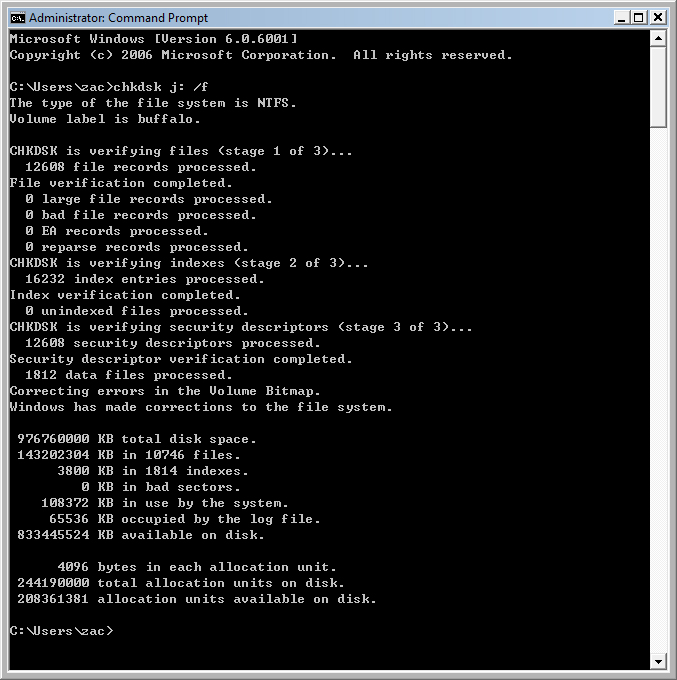
10) Wait for few minutes to let the program fix the errors on your external hard disk. For me, it took about 5 minutes to fix it. Below is the screen shot that show the fix of my external hard disk :

Sabtu, 19 Februari 2011

How To Export Firefox Extensions

If you are using two computers and if you want to export / copy / transfer / send the Firefox extensions from 1 computer to other computer, you can follow the following steps :
1) Download and install FEBE extension to your Firefox.
2) Restart your Firefox.
3) On your Firefox, click Tools > FEBE > FEBE Options > Directory > Change the directory to your desktop, so that all the extension backup files will be saved on your desktop later.
4) On your Firefox, click Tools > FEBE > Perform Backup.
5) Now you see all the extension backup files are on your desktop.
6) Send all the extensions backup files to your other computer.
7) Open Firefox on your other computer, click File, click Open File, select the extension backup file.

Note that you must open 1 by 1 of the extension backup file to restore all the extensions onto the Firefox of other computer. If you have more than 30 extensions backup files, you will need to repeat the same tasks for 30 times!!! It is very inconvenient. Actually you can use a software to combine all the 30 extension backup files into 1 backup file. Steps :
1) Download and install CLEO extension to your Firefox.
2) Restart your Firefox.
3) On your Firefox, click Tools > FEBE > CLEO > CLEO Options > Directory > Change the directory to your desktop, so that the extension backup files will be saved on your desktop later.
4) On your Firefox, click Tools > FEBE > Create Cleopack > Select items to package > Select all the extension backup files that you have created by FEBE just now.
5) Now you see the cleopack file is on your desktop.
6) Send the cleopack file to your other computer.
7) Open Firefox on your other computer, click File, click Open File, select the cleopack file.

Faster Your Computer / Laptop performance

1) Remove spyware, and help protect your computer from viruses.

2) Free up disk space by using Disk Cleanup to:
* Remove temporary Internet files.
* Delete downloaded program files, such as Microsoft ActiveX controls and Java applets.
* Empty the Recycle Bin.
* Remove Windows temporary files, such as error reports.
* Delete optional Windows components that you don't use.
* Delete installed programs that you no longer use.
* Remove unused restore points and shadow copies from System Restore.
To open Disk Cleanup = Click Start, click All Programs, click Accessories, click System Tools, and then click Disk Cleanup.

3) Speed up data access by using Defragment.
Run Disk Defragmenter once a week, there are other times you should run it, too, such as when :
* You add a large number of files.
* Your free disk space totals 15 percent or less.
* You install new programs or a new version of the Windows operating system.
To open Defragment = click All Programs, click Accessories, click System Tools, and then click Disk Defragmenter.

4) Repair disk errors by using Error Checking utility.
If you use your computer daily, you should run this utility once a week to help prevent data loss. To open Error Checking Utility = Go to my computer > right click on the c or d drive > properties > tools > error checking.

5) ReadyBoost (only for Vista and Windows 7).
You can use ReadyBoost to speed up your system. It is a new concept in adding memory to a system. Windows ReadyBoost can use storage space on some removable media devices, such as USB flash drives, to speed up your computer. When you insert a device with this capability, the AutoPlay dialog will offer you the option to speed up your system using Windows ReadyBoost. If you select this option, you can then choose how much memory to use for this purpose. However, there are some situations where you may not be able to use all of the memory on your storage device to speed up your computer.

Some universal serial bus (USB) storage devices contain both slow and fast flash memory, and Windows can only use fast flash memory to speed up your computer. So if your device contains both slow and fast memory, keep in mind that you can only use the fast memory portion for this purpose.

The recommended amount of memory to use for Windows ReadyBoost acceleration is one to three times the amount of random access memory (RAM) installed in your computer. For instance, if your computer has 512 megabytes (MB) of RAM and you plug in a 4 gigabyte (GB) USB flash drive, setting aside from 512 MB to 1.5 GB of that drive will offer the best performance boost. The minimum size for any USB flash drive to work with Windows ReadyBoost is 256 MB.

You can enable or disable Windows ReadyBoost for a specific flash drive or other removable storage device. Steps :
# Plug a flash drive or other removable media device into your computer. This should automatically open AutoPlay (You must turn on AutoPlay feature on your windows to do that).

# Under General Options, click Speed up my system. This will display the Properties dialog box for your flash drive or other removable media device.

# Click the ReadyBoost tab, and then do one of the following:
* To turn ReadyBoost off, click Do not use this device.
* To turn ReadyBoost on, click Use this device, and then move the slider to choose how much of the available space on your flash drive you want to reserve for boosting your system speed.

# Click OK.

Sabtu, 12 Februari 2011

BT-250 Driver Is Not Found

BT-250 is bluetooth device. I guess you did install the bluetooth driver already, but when you on the bluetooth device, is show "Found a new device" and still asking you to install the driver again.

Reason
It was because you off the bluetooth device when you are installing the driver.

Solution
You must on the bluetooth device first, then you install the driver.

For my case, I just bought Asus EEE PC Touch T91, I format it and install XP Pro 86bit version, I though the bluetooth driver is support 32bit and 64bit windows only, so I went to google search for 86bit version of driver, but I can't find it. Then I read the instruction of installing the bluetooth driver, then only I realize that actually I need to on the bluetooth device before I installing its driver. Haha.

Kamis, 10 Februari 2011

Cannot Download Msn / Windows Live Messenger / Cannot Open Microsoft Website / Cannot Install IE

If you are facing the problems that shown below :
1 - You want to download some software from Microsoft website, but when you click "download" button, the Microsoft website suddenly show the error "page not found".

2 - You want to download windows live messenger, but when you click the "download" button, the website suddenly show the error "page not found".

3 - Cannot install new version of Internet Explorer such as IE 8 or IE 9.

solution - Please follow the steps below :
1) Goto Start menu or click "Windows" button on your keyboard
2) Click "Run" (for xp). Skip this step if you are using Vista.
3) Type Services.msc in the Run box / search box.
4) Right click on DNS Client.
5) Choose Stop.

Done!!! You can go try to download the software from Microsoft website or try to download windows live messenger now. Good luck!!

You might also like this : If cannot sign in msn, solution here!

Kamis, 03 Februari 2011

Cannot Format Pendrive? Use This Software.

Your pendrive cannot be formatted? You can download a software to format your pendrive. Instruction steps :
1 - Click here to download the software in zip file format.
2 - Use 7zip or Winrar or Winzip to open it.
3 - Copy the SP27608.exe file to your pendrive.
4 - Double click on the SP27608.exe file in your pendrive to install it to your C: drive in your computer.
5 - On your computer, open/run the software to format your pendrive. (Don't choose quick format).

I did try to use this software to format my 64gb and 32gb pendrives, and it works!!! Hopefully it works for your pendrive.

Sabtu, 01 Januari 2011

Fix WAMPserver or XAMPP Localhost Shows Blank Page

Fix the problem of Wamp Server or XAMPP Localhost Shows Blank Page!!! After installed WAMP Server / XAMPP, if you have such errors like :
1 - localhost shows blank page.
2 - localhost and phpmyadmin page giving empty body.
3 - Your port 80 is actually used by Server Platinum ...
4 - The service has not been started.
5 - localhost is not working.
6 - wamp / apache server could not start.

The reason cause this error :
Your wamp server / XAMPP is using port 80, if your other program like antivirus or online movie player or skype is also using port 80, then your wamp / XAMPP will fail and not working. So you need to delete the program that using port 80!!!

Solution :
I am here to guide you how to check which program is using port 80, and how to delete it. Please follow the 7 steps below :

Step 1 - Open Command Prompt by clicking on Start button on desktop or press Windows button on keyboard, then type cmd into the "Search" box, then press Enter button on keyboard. Then you type netstat -aon into the black box, then press Enter button on keyboard. Then search for the digit "80" from the field of "Local Address".

Step 2 - Remember the PID number of the local address which has the digit "80"

Step 3 - Press CTRL + ALT + DELETE button keyboard to open the Task Manager. Then click "View" from top menu, then click "Select Columns...".

Step 4 - Then tick the box of "PID (Process Identifier)", then click "Ok" button.

Step 5 - Search the PID number that you remember just now, and click it.

Step 6 - Click "end Process" button to delete it.

Step 7 - Click on the WAMP Server / XAMPP icons which is near the time of your computer there, then click "Restart All Services".

That's all. Hopefully it can help to solve your problem. If you don't mind, please write a comment below to tell me which of your program is using port 80. My case is QVOD online movie player, haha.

Kamis, 30 Desember 2010

PPstream Slow Down Internet - Fixed

Did you realize that your Internet speed becomes very slow when you are opening ppstream or µTorrent or BitComet or eMule, or TVUplayer or TVants or PPLive or ppfilm? Do you want to fix this problem? There are 3 different solutions :
Solution 1 :
Download the latest version of Half-open limit fix software. After finish download, you open it and click "Add to tcpip.sys" button. Then Restart pc. That's all ! So easy ! Wow

For those who want to know why this happen :
Microsoft company want to reduce the chance of Windows XP and Vista getting attacked by virus, so Microsoft set the limit for concurrent half-open outbound TCP connections, the default value of the limit is 10, meaning you can open 10 TCO connections at the same time. As we know those ppstream, µTorrent, eMule and XunLei are using p2p network to send data to our computer. p2p network using many computers to send data to our computer. let's say there are 30 computers in the p2p networks are sending data to you, 1 computer has 1 TCP connection, so 30 computers has 30 TCP connection. So, if you windows xp or vista set the limit number of TCP connection to 10, meaning you can accept only 10 out of 30 computers in the p2p network, so when you go to open a website such as www.google.com, your computer doesn't have extra space to accept another TCP connection from google.com. That's why you cannot open google.com website when opening ppstream or emule or xunlei. So, now we use Half-open limit fix to change the limit 10 to limit 100 so that we can accept 100 TCP connection at the same time! wow. Anyway, I am a not a professor, I don't really sure what I say is correct or not. Haha, so please correct me if I am wrong. Thanks.

My Personal Experience:
I was about 2 years didn't use PPStream anymore since I change my wireless router to use Australia firmware which block all p2p network. But now PPStream improve a lot, I have no idea how can they fix the problem of being blocked by Australia firmware. Anyway I just tried to install and use ppstream last night. And wow, I saw ppstream improve a lot, their website becomes so beauty and added more fuctions like allows direct watch ppstream through the website and able to change my msn messenger personal message to show the movie title on my msn personal message. It is still ok when I 1 computer open ppstream, but when I install ppstream on my brother laptop, and when he open ppstream, 3 of my msn messenger totally cannot sign in, and I cannot open any website! So, after I change the limit 10 to limit 100, my 4 msn messengers can open at the same time as usual. And I can open website, surfing net without a problem, just a little slower than normal. Lol.


Solution 2 :
This solution is to prevent other computer open pps to slow down your internet speed. You can download and install bandwidth management software such as :
1 - NetLimiter (Shareware)
2 - SoftPerfect (Shareware)
3 - Shunra Nimbus (Freeware)
4 - Traffic Shaper XP (Freeware)
Use the software to limit your internet speed and bandwidth. More info at : http://www.raymond.cc/blog/archives/2008/02/22/restrict-or-limit-internet-download-and-upload-transfer-speed/


Solution 3 :
When u are watching pps, u are uploading what u have downloaded to other watchers from everywhere on internet. The uploading speed eat all your internet speed, that's why your website loading speed become slow, and causing slow internet speed to other computers in your network too. Picture below shows I was downloading and uploading the movie at the same time :

PPS is a greedy, if you have 4mbps modem, pps will use all full speed of your 4mbps modem to upload the movie to other users on the internet. So your website loading speed will be slowed down and your family computers internet speed also will be slowed down too. So you must limit or block the uploading speed of your PPS. How to block the uploading speed? Below are 3 different ways to block the uploading speed :
a) Pay money amount rmb20 to upgrade your pps account to gold, then your pps will not upload movie to other users when you are downloading movie. PPS黄金会员 : 免上传,看PPS不再影响网页浏览,不再影响他人电脑网速。

b)Use software to limit uploading speed. As I said earlier PPS is greedy, it will use full speed of your 4mbps to upload movie to other users. So you have to limit the uploading speed. You must not be selfish, don't limit it to 0kb/s, at least give it 5kb/s so that other users on internet can watch pps smoothly. Picture below show that I used software to limit pps uploading speed to 5kb/s :

You can download the software name "FluxEye" from http://2aek.com/inventory/donshare.rar or from http://cache.ourdev.cn/bbs_upload568426/files_10/ourdev_395773.rar. Then install it, then open it. (Tip : after you download the file, you need to open the file with 7zip or winzip or winrar). I saw an user said FluxEye is not reliable : "我在VISTA下,发现上面的流量限制软件能运行,但不可靠:比如我将 PPS的速度限制了,我想修改或取消限制,却执行不成功。其它的进程可以。 国产软件的通病啊". Maybe you can try use software name "Traffic Shaper XP". Reference at : http://www.ourdev.cn/bbs/bbs_content.jsp?bbs_sn=1429184&search_text=iamyanh

c)Set your ADSL router to block the outgoing port / uploading port for PPS (I'm not sure how to do it. Please teach me if u know).

You might also like : How to fully exit PPS? | Block computers in the same network open PPS

Last Updated on 27 August, 2011

Senin, 20 Desember 2010

Hack Streamyx Account

Streamyx is too expensive for you? Do you want to get a FREE Streamyx Account to use? You can get more than 1000 FREE Streamyx ACC!!! WOW!!! But how? There are two different methods to hack Streamyx accounts :
- Method 1 will hack successful if the user didn't change the default password of modem / router.
- Method 2 will hack successful if the user didn't change the default password of Streamyx account.

The content is LOCKED until there are 1000 likes!!!

If you can't wait for 1000 likes, u can pay me RM50, and I will teach u immediately!!!
I have locked up the contents of instruction steps to hack Streamyx account due to 3 reasons below :
1) Many people are not happy that their accounts being hacked. Although they misunderstand that their internet slow is because of being hack. In fact your internet speed won't be slowed down when people hacked your account. So you should not blame the hacker if your internet speed is slowed down. You should blame Streamyx company!!! Streamyx company didn't improve the backbone on your house area, that's why you facing internet slow!!! Info at here.

2) I think hacking is stealing which is a bad behaviour. But actually there is different between stealing and hacking. Stealing thing from people will make a people lost something and feel sad. Hacking people's Streamyx account will not slow down the internet of the people, will not cause any lost of the people, so the people won't feel sad. But it will make Streamyx company lost some profits. On my opinion, Streamyx account price is very expensive but still they can't give us more speed. Korea country RM100 for 100mbps, but Malaysia country RM88 for 1mbps? What a shame?!!! How can we fulfill the words "Malaysia Boleh" ???!!! Year 2012 January will increase 6% tax for Streamyx fee!! What happen to the promise that they said to make internet affordable? TM did not reduce the price for streamyx for the past 10 years!!! So do you still think that hack Streamyx account causing Streamyx company lost some profit is consider as bad action?

3) There are very less people want to learn hacking. I will UNLOCK the contents if you guys can prove that there are still many people want to learn hacking. To prove that, please click LIKE button. I will UNLOCK the contents when I receive 1000 Likes on this post, mean if there are 1000 people want to learn hacking, then only I will teach hacking!!! You can scroll down to the bottom of this post, then click Like button there. Currently there are 43 Likes only.


So, now if your family don't have money to pay for streamyx bill, you can stop paying the streamyx bill, your streamyx account will be removed, but you still can use those hacked streamyx account for free!!!

If you wondering when you are using other people's streamyx account, will the people disconnected or their internet speed will be slowed down? The answer is they won't be disconnected because their account can be logged in by many users at the same time. Their internet speed will not slow down too if you use their streamyx account.

If you want to know the account you are using is 1mbps or 4mbps account? you can test your speed at : http://speedtest.tm.net.my.
800kbps - 1.5mbps = 1mbps account.
1.8mbps - 2.5mbps = 2mbps account.
3mbps - 5mbps = 4mbps account.

For those who want to use 4mbps account, you must consider two things below :
1) Your area / place can support 4mbps? Some area are not support 4mbps.
2) Do you have 4mbps port? If you have sign up 1mbps streamyx account previously, they have set up 1mbps port at your house. Your 1mbps port cannot support 4mbps speed, so you need to ask streamyx technician go to your house change your port to 4mbps port. You can check your port through your modem / router setting page. Picture below is about my router setting page shows my port is 2mb port :

If you feel your streamyx internet speed is very slow, so you want try use other people's streamyx account see whether or not the speed can be faster? I did try it but it was not work, because the factor that slow down your internet is not because of your Streamyx account but it is because of the backbone in your house area got problem. If you want to know more info about why your internet speed slow because of backbone, please visit http://ye5.blogspot.com/2010/11/fix-my-streamyx-slow-connection-problem.html.

Last Updated on 27 November, 2011