Tampilkan postingan dengan label Netbooks. Tampilkan semua postingan

Senin, 02 Januari 2012

What to expect in CES 2012 - Intel based Mini-Notebooks

CES 2012. The 2012 Consumer Electronics Show starts next week which will give us a taste of what to expect in 2012. Before you get too excited, we really do not expect all the products shown at CES 2012 to be available immediately, but most will come out in the market by March to April 2012. Some will be available immediately.

The Netbook officially dies. Intel is starting to ship the Atom N2600 and N2800 Cedar Trail Atom processors. The new Atoms will run at 1600 MHz and 1833 MHz respectively and will finally being 1080p video playback support to the Atom, allowing it to catch up AMD's Fusion platform. This is long overdue.

Still the Cedar Trail processors are not expected to have as much processing and graphics power as the AMD Fusion C-60 and E-450 chips, they are much cooler running and less battery hungry with a termal design point of 6.5W. 

With the release of the Intel N2600 and N2800 expect to see the term netbook disappear, the new "netbooks" being marketed as multimedia mini-notebooks instead.


Ultrabook like designs. With a TDP of 6.5W expect to see these mini-netbook in ultra slim ultra-light designs similar to the Asus Eee PC X101.

Long battery life. You can also expect longer battery life from the new Intel N2600 and N2800, some with battery life as long as 10 hours.

Tablet alternative. Whether the Intel's new chip will be enough to slow down the onslaught of tablets remains to be seen until Intel gets into the tablet game. I think it might. Coupled with all the recent news about medical problems the occur because of bas posture caused by too much use of tablets and smartphones, I think these new mini-notebooks will find a market. They are really much better for the posture.

A decade ago we were looking at desktop screens level of out face. Now we glance down a few degrees to look at our laptop screens. Tablets for us to anlge our head forward even more which over a few years of use could cause serious back problems.

Availability. Given that Intel has been shipping the N2600 and N2800 since Q4 of 2011, we expect to see the new Mini-Netbooks in a few weeks.


Senin, 17 Oktober 2011

Is the Tablet the next Netbook?

It has been a year and a half since Apple launched its successful iPad. If you read technology sites all around the world, it would seem that the tablet will kill the personal computer. 

iPad make excellent gaming platforms among other things.

I got a tablet in January 2011 and quickly passed it off to my wife. It has been less useful than it looked. Basically, I am sticking to the laptop and smartphone combination from now on, and will sit on the sidelines watching the tablet market with interest.

In one year and one quarter since its launch, as of June 2011, 28.7 million iPads have been sold. Android tablets, sales are estimated at less than 3 million since their release.

In one quarter, Gartner reports that almost 92 million personal computers, not including tablets, have been sold. That is in just one quarter versus five quarters of tablet sales. Could the tablet be the next netbook? Something to tide us over in though economic times?

Tablets share a lot with netbooks. Like the netbook they are cheap and portable. Like the netbook they are of limited use. Overall, while tablets are more functional than netbooks, most of what you can do in a tablet, you can do on a smartphone. Android tablets have a higher mountain to climb. The latest generation of smartphones are really now mini-tablets.

Lenovo tries to define a role for its tablet.

Is the tablet the next netbook? Or are we entering the era of keyboard less computing.  I think, tablet will fail as a productivity device, but makes a excellent multimedia and gaming platform. Basically, I do not see it going away, neither do I see it growing as much as predictive by experts. This one is too hard to call.  Would love to hear you chime in.

Update: We got some new data on tablet sales from Digitimes for the third Quarter of 2011. So are the figures from both Gartner and Digitimes for comparison -

Desktop and laptops - 92 million.
Tablets - 18.9 million (13 million Apple iPads and 5.9 million tablets of other brands)


Selasa, 13 September 2011

Looking for a Asus Eee PC X101

I wrote about the availability of Asus new ultra-thin and ultra-cheap netbooks, the Asus X101 and the X101H a week ago. Both are 10-inch Atom powered netbooks, with the X101 having a 16GB SSD and a slimmer 0.69-inch thick case, while the X101H has a 250GB hard drive with and a chunkier 0.89-inch case.  


I was looking for a X101, to use as a Linux box. Take it out of the box, wipe Meego from the drive and install Ubuntu... well that was the plan.

Unfortunately, I was unable to find one. While the X101H is available pretty much everywhere, I I could find the X101. A retailer told me that their orders for the X101 have not come in yet and they are not expecting it soon because of a driver  issues with the SSD drive.

So, for those who want an X101, we have to wait a bit more.

Minggu, 04 September 2011

The case for the Asus X101 & X101H


Poor mans MacBook Air? Lets start with what will make you consider buying this netbook. The Asus Eee PC X101 weighs in at 2 pounds while  the  X101H weight in a 2.2 pounds. Both netbooks very handy having a width of just of 10.3 inches, a depth of 7.1 inches, which is the size of your typical 10-inch netbook. The PC X101 is  a MacBook Air like 0.69 inches thick, while the X101H is a thicker, but still a slim 0.89 inches.

What else makes the X101 and X101H very tempting? It is the price. The X101 is priced at just Php9,995 while the X101H is priced just a little higher at Php10,995.

Storage distinguishes the X101 from X101H. The main difference between the X101 and the X101H, is storage. The X101 has a 16GB SSD drive and a MicroSD card reader. This will allow you to expand storage to up to 48GB. The X101H comes with either a 250GB or 320GB hard drive. We understand the Philippine version will come with a 250GB hard drive. 

Netbook genes. The Asus Eee PC X101 has the typical netbook 10.1-inch 1024 x 600 resolution screen. Inside you will find, an Intel Atom N435 or N455 processor and 1GB of RAM. The Philippine version will have the faster N455 version. I really have no strong preference between these two processors, the N455 is a bit faster, the N435 is a bit more energy efficient and runs a bit cooler. Given a choice between the two, I would probably choose the slower but more energy efficient N435.

Given the modest specifications, you should have reasonable expectations of what these netbooks can do. They are more than sufficient for web browsing, typing documents, preparing spreadsheets and presentations and managing your social networking. 

I would not try to do any 3D gaming with these machines, or serious photo editing. The modest specifications also mean the these laptops cannot seamlessly play HD (720p or 1080p) video. Basically, it is a not a good multimedia platform.

These netbooks come with small 3-cell batteries. Asus rates them at 4 hours or battery life. But while web browsing on WiFi I would expect a little under 3 hours. This is probably the biggest drawback of these netbooks.

MeeGo inside. While a Windows version of the X101H is available for a higher price, the current models being has the Linux based MeeGo operating system installed. While the mention of Linux normally scares most buyers, and netbooks which originally ran Linux operating systems quickly coverted to Windows three years ago, I think MeeGo acceptance will be easier today.
I think with many users now having gotten used to non-Windows operating systems and applications in their smartphones, so they wont feel lost with a laptop that does not run Windows. While you can install Windows on the X101H I recommend you give MeeGo a try. This operating system has much lower system requirements than Windows 7, is designed to work in smaller screens and will run faster than Windows. With OpenOffice installed, which is compatible with Microsoft Office formats and dedicated Facebook and Twitter apps, it is good to go out of the box.

Wing design. Whether you like these laptops or not, I suspect most would give a approving nod to the new "Wing" design which will replace the Sea Shell design Asus has been using in their 10.1-inch and 12.1-inch netbooks and laptops. A 12.1-inch AMD Fusion (HD capable and HDMI packing) powered versions of these netbooks with a larger battery would really be interesting. 

Should you buy one? I think these are nice alternatives to a tablet. First they are half the price of a tablet. Second, since they have physical keyboards, they are a better choice for people who type a lot.

When my current Linux box dies (it is a 4 year old HP Compaq 6510b - a real workhorse) I will probably get one of these things and use it as my Linux machine.

Senin, 22 Agustus 2011

The car, the pick-up and the truck

More than a year after the Apple iPad's release, with more than 30 million sold, people still question whether the tablet is a practical device. The answer to that is a simple yes.
As the "Personal Computer" has evolved it, has moved from a machine designed for business, to a household device, and now is a personal communication,  entertainment and productivity device.

For years we were stuck with the desktop as our only personal computer, for reasons of cost. The laptop had been around for some time, since the Dulmont Magnum in 1985. But with the entry level model going for US$2,995. That was a lot of money in 1985, and it is still a lot of money today. It was only after the year 2000 that laptops started dropping in price and became available to the regular consumer as an alternative computing choice to the desktop. The tablet now gives you a third choice.

The tablet is the car of the computing world. A good choice to take you around day to day, but with its primary function being people transport. A tablet is useful for someone whose computing needs is mainly web browsing, reading and writing email, note taking, instant messaging, listening to music, basic photo editing, watching movies and playing games. Some in the industry call it the "media" tablet, and that is pretty much correct. A tablet is a great computer for someone who does not use the computer for work. I know many will disagree with this. 

The laptop is the pick-up truck of the computing world. Small enough to be a daily driver, and capable enough to do some serious work. Many people chose a laptop for lack of choice, but if you do not spend much time typing documents, preparing spreadsheets and the like, a keyboard is not all that important. If you don't use a keyboard much, the virtual keyboard of the tablet should be sufficient. You could add a keyboard to a tablet, but than it really just becomes a ARM powered laptop, with a touchscreen and a detachable keyboard.

The desktop is the truck of the PC world. The desktop is still the platform of choice for those who need a computer for a dedicated task, whether that task be a workstation or a hardcore gaming machine. The highest end desktop components still have a little more power than the highest end laptop components.

Which one is best for you? It really depends on your needs. Do you need a car, a pick-up or a tuck?


Minggu, 21 Agustus 2011

Mobile computers: The Desktop Replacement still rules


A recent article on LaptopMags Blog was rather eye opening. The mobile computing world is not as mobile as we think. For the first quarter of 2011, The breakdown of mobile computer sales for the period are as follows: 

Tablets - 13.8%
10-inch netbooks/laptops - 16.3%
11 and 12 inch netbooks/laptops - 4.3%
13 and 14 inch laptops - 27.1%
15 inch laptops - 33.6%
16+ inch laptops - 5%

The world is going more mobile, but not as fast as we think. Better than one in three laptops sold had a 15-inch screen, with another 5% having even larger screens. This is the category of laptops often referred to as desktop replacements typically weight six pounds or more by buyers who do not expect to carry their devices around too much. This is lower than the previous year, so there is a trend towards smaller and lighter.

Q1 2010

15 inch laptops - 35.2%
16+ inch laptops - 8.9%

Total: 44.1%

Q1 2011

15 inch laptops - 33.6%
16+ inch laptops - 5%

Total 38.6%

Netbook sales have slowed down, but not as fast as we think. Sales of 10-inch laptops for Q1 2010 and Q1 2011 were as follows:

Q1 2010 (10 inch netbooks/laptops) - 17.1%
Q1 2011 (10 inch netbooks/laptops) - 16.3%

The real difference is not volume, but price. Netbook prices have been dropping since the introduction of the tablet, which should mean smaller margins for a product that was already producing small profit margins.

Tablets are popular, but mainly in North America. The figures of tablets sold in Quarter 1, 2011 were as follows:

North America - 24.8%
Worldwide - 13.8%

iPads are popular, but mainly in North America. The figures of iPads sold in Quarter 1, 2011 were as follows:

North America - 22.6%
Worldwide - 10.7%

Basically, the exciting new gadgets which are the darlings of tech writers are not as popular and do not sell as well, as old clunky desktop replacements.

Selasa, 26 Juli 2011

Asus Eee PC X101 - Will netbooks be sexy again?


HardwareZonePH has the new Asus Eee PC X101 in their labs (pictures on their Facebook page here). The Asus Eee PC X101 is a 10.1-inch Atom powered netbook. It will be offered with both the Meego Operating System (yep the same one in the new Nokia phone), and there will also be a Windows 7 version.

The processor of the X101 is a single core Atom N435 running at 1.33GHz (some sources say 1.5GHz) and the system will come with 1GB of RAM. Power comes from a 3-cell battery. For storage the Meego version has a 8GB or 16GB SSD hard drive. The Windows version names X101H will have a 250GB hard drive.  

What is so special about this? The X101 is all of 0.69 inches thick. Weight will be just over 2 pounds. That is MacBook Air thin and light. The Meego version will retail for US$199, so it looks like we will see a 10-inch netbook a below Php10,000. Aside from being thin, it will be dirt cheap. The Windows version, the X101H will cost US$310, so it will be priced the same as todays entry level netbooks. With the N435 processor, and 1GB of RAM, I do not think this will run very well with Windows 7. The Meego version looks interesting, the 28Wh battery worrisome, but we will have to wait for the reviews.

Now, if Asus built one of these things in 11.6-inches with a AMD C-50 inside...

Jumat, 17 Juni 2011

The unwanted netbook soldiers on


 The netbook may be about to disappear, but it is amazing what changes this product brought to the laptop market. Three years ago, a 10.1-inch Atom powered netbook would cost you Php25-30K. When the first netbooks came out, finding an ultraportable under 30K was amazing. A 12.1-inch ultraportables back than would cost you more that three times as much.  The netbook provided a cheaper alternative to those wanting a 3-pound laptop but not willing to pay the premium price.
By 2009, the price of a netbook went down to 20-22K. But the notebook changed enough to make updating your one year old model worthwhile. Intel did not give you a good reason to upgrade your netbook, but netbook manufacturers package larger batteries with their 2009 models. While most netbooks in 2008 came with 3-cell batteries, most 2009 models came with 6-cell batteries makign all day  computing commonplace. 

In 2010, netbook pricing remained pretty much stagnant, and technology remained pretty much stagnant. Dual Core Atom's did not provide a significant performance boost giving you little reason to upgrade. At the same time, Apple changed the mobile scene with the tablet and ultraportables powered by Intel's Core i3 became available at about 30K closing the price gap with netbook while providing performance levels way beyond what any netbook could could produce.

Intel let netbook technology remain stagnant, as if it were a platform they wanted to kill. The truth of the matter is they did. Profit margins on netbooks are small, but in the wake of poor economic conditions, selling these cheap boxes kept sales up in a weak market. Netbooks were a temporary placeholder to be phased out, when the market grew tired of their sluggish performance and when the economy improved enough to allow buyers to spend more for a more powerful laptop.
By this time, Intel was probably itself hoping the netbook was dead with the market flocking to higher priced laptops. What Intel did not foresee was that the tablet would come around, and the cheap netbook platform would not be phased out by more expensive laptops, but by low priced tablets.

With the advent of the tablet, the netbook has been forced to soldier on, and to meet the tablet onslaught, what would have cost you 20-22K in 2009 and 2010, would cost you about 11K to 15K today, priced just under the tablet price point. Without a viable tablet contender, Intel has been forced to have the netbook soldier on and drop its price. The netbook is a placeholder once again.

Sabtu, 28 Mei 2011

Acer Aspire One 722 (AO-722-C52) and 12.1-inch Asus Eee PC 1215B

Update: Acer has released a updated Acer Aspire One O722-C60, details at this link.

Two new AMD Fusion powered laptops are now available in the market. By we are going to greet these two with a yawn. The first is the 11.6-inch Acer Aspire One 722 (AO-722-C52) with a suggested retail price of Php21,990 pre-installed with Windows 7 Starter. The second is the 12.1-inch Asus Eee PC 1215B with a suggested retail price of Php19,990 without an operating system.

Acer Aspire One 722

While more AMD Fusion options are welcome, these two are equipped with the slower AMD Fusion Brazos C-50 with 1.0 GHz dual core processor and Radeon 6250 graphics processing unit. This processor and graphics combination is more than adequate, providing performance on par with a dual core Atom with Nvidia Ion.

Asus Eee PC 1215B
But before you buy one of these C-50 units take a look at the HP Pavillion DM1-3016AU with the more powerful AMD Fusion Zacate E-350 with 1.6 GHz dual core processor and Radeon 6310 graphics processing unit. The HP Pavillion DM1-3016AU, has twice the processing power and 30% more graphics punch than these C-50 units.

The Acer Aspire One 722 (AO-722-C52) and Asus Eee PC 1215B do come with larger 500GB hard drives, as against the 320GB drive on the HP Pavillion DM1-3016AU. The slower C-50 might also mean longer battery life than a Zacate powered system but, we need to wait for more reviews and user feedback to verify this.

Could be an interesting option if the battery life is significantly longer, but right now the the HP Pavillion DM1-3016AU is looking like the value for money option among the three.

Update: Asus has released an E-450 version of its Eee PC 1215B. Looks like it might be the best of the bunch,

Sabtu, 21 Mei 2011

The Netbook lives on


Neilsen reports that the adoption of tablets adoption is growing quickly. By the end of the second quarter of 2010 2.8% of all Americans owned a tablet. By the end of the first quarter this year, 4.8% of all Americans owned a tablet.  


Contrary to popular belief the netbook market seems to be alive and well too. By the end of the second quarter of 2010 5.8% of all Americans owned a tablet. By the end of the first quarter this year, 8.2% of all Americans owned a tablet. 

Tablets:

Q2 2010 - 2.9%
Q1 2011 - 4.8%

Netbooks:

Q2 2010 - 5.8%
Q1 2011 - 8.2%

But these figures do not tell the whole story. With dropping netbook prices, profit margins on these devices are smaller than ever. Tablet profit margins must be fairly thin too, but every tablet sold means app sales and Adsence income.  
 

MeeGo 1.2 Operating System for netbooks and tablets | Download MeeGo 1.2 Core

Download MeeGo 1.2 Core OS 

Download MeeGo 1.1.2 SDK Update

Download MeeGo SDK for Linux

Download MeeGo SDK for Windows

MeeGo 1.2 has been made for netbooks and tablets, leaves handsets hanging on the telephone and new audio and networking stacks have also been added for A2DP streaming and HSPA+ support.By this release developers to start creating software for various device categories on Intel Atom and ARMv7 architectures and this means that over the next few months we should see MeeGo being more prominent in the smartphone market, provided developers and hardware manufacturers decide to pick up the OS and run with it…………..
Meego os Downloads


The MeeGo project developers have announced the release of MeeGo 1.2, described as a solid baseline for device vendors and developers to start creating software for various device categories and promising mobile operating system which can run on a number of devices including smartphones, MIDs, Tablets, Netbooks and In-Vehicle systems. This release provides a solid baseline for device vendors and developers to start creating software for various device categories on Intel Atom and ARMv7 architectures.The MeeGo 1.2 Core OS provides a complete set of enabling technologies for mobile computing.
Some highlights of the MeeGo Core stack include:
  • MeeGo Reference Kernels supporting a variety of Intel Atom and ARMv7 platforms.
  • QML Application Framework and extended Qt-Mobility APIs, including additional location, system, connectivity, and sensor/haptic capabilities for rapid, rich, application development.
  • Enhanced Telephony and Connectivity capabilities, including:
    • GSM, GPRS, and HSPA+ network support
    • SIM Application Toolkit
    • Expanded Bluetooth profiles
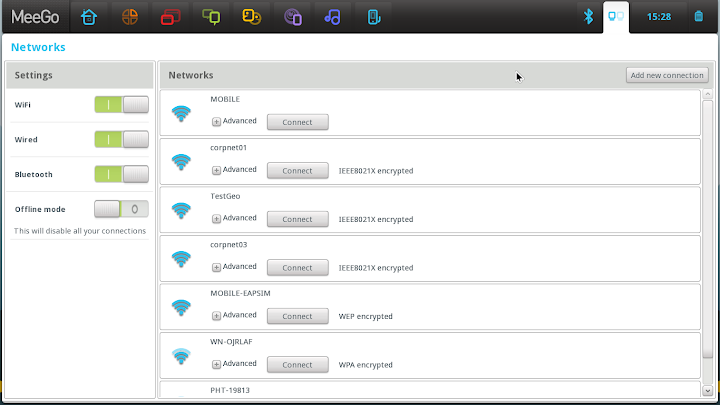
    • Expanded VPN and wireless authentication methods
    • USB, WiFi, and BT-PAN data tethering capability
    • Enhance multimedia support, including RTSP streaming with progressive download

This release also includes the following:

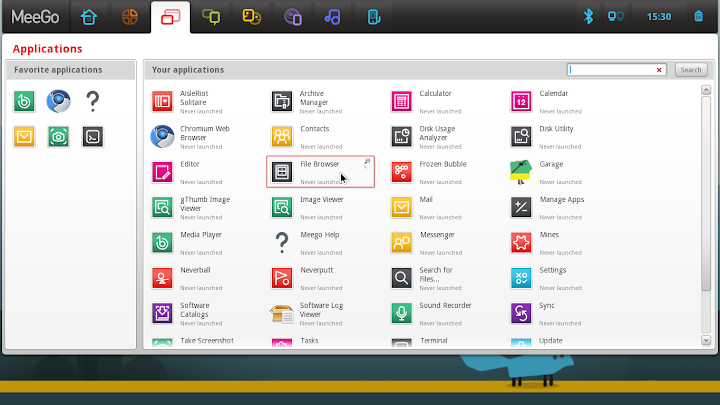
  • Netbook UX 1.2 complete set of core applications for netbooks.
  • In-Vehicle Infotainment (IVI) UX 1.2 includes a sample IVI Homescreen and speech recognition enabled Application Launcher built with QML, as well as a collection of commonly used applications.
  • Tablet Developer Preview
  • MeeGo SDK 1.2 for MeeGo Core OS and supported UXs.

The MeeGo Netbook User Experience includes:

  • Visually rich netbook user experience, built on the latest open source technologies.
  • Touch support integrated on netbooks/nettops.
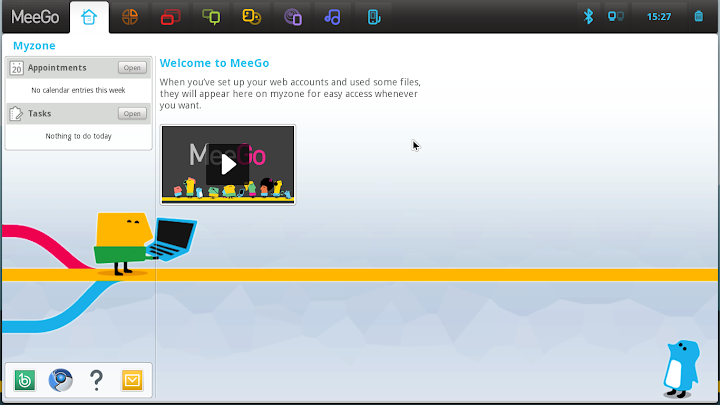
  • Instant access to your calendar, tasks, appointments, recently used files, and real-time social networking updates through the home screen.
  • Aggregation of your social networking content. This allows you to see your social networking activities on one screen, easily interact with your friends, and update your status and site information.
  • For a fast and rich internet experience: MeeGo Netbook user experience integrates Google Chrome or, if you prefer a fully open source browser solution, Google Chromium is also provided.
  • Easy to use applications for email, calendar, and media player.
  • Power and performance optimization.
  • Languages: Japanese, Korean, Chinese Simplified, Chinese Traditional, Swedish, Polish, Finnish, Italian, Brazilian Portuguese, French, German, Spanish, Russian, Dutch, English, and British English.

MeeGo v1.2 Core Software Platform Features include:

  • Complete MeeGo Compliance packages for ensured compatibility.
  • GCC 4.5.1 toolchain with great support for the Intel Atom* micro-architecture and the Intel SSSE3 instruction set, as well as with great ARM support. It has Linaro 2010.09 patches adding hard floating-point for all known ARMV7-A chipsets including Tegra2 and Marvell chips with sub-architectures of Thumb2/Neon.
  • Linux kernel 2.6.37, with support for Intel Atom processor Z6xx series family and Nokia N900 with working power-management and numerous bug fixes.
  • X.org Server 1.9.0 and Mesa 7.9.1, for improved 2D and 3D graphics performance.
  • Qt 4.7.2 and Qt-mobility 1.2, providing a rich set of APIs for creating compelling applications that include location, sensors, contacts, and messaging. The new version of Qt enables GLLE-only builds and adds multi-point touch support through XInput2 API and many performance optimizations. On the ARM side, it conducts ARMv7 optimizations and runtime detection for enabling NEON optimization. For Qt-mobility 1.2, it adds a new connectivity subpackage and enhanced camera support, it also adds libva and GLESv2 shader support.
  • New Connman connection manager with a lot of bug fixes and new features like tethering, openvpn, setting proxy auto-configuration, IPV6 DNS connections and regulatory domain settings, and more.
  • New Ofono telephony stack with extensive bug-fixes and features like support for many new modems, improved SSN and voicecall handling, multiple AT channels, call forwarding and SIM refresh, emergency calls without SIM/PIN, and more.
  • Pulseaudio 0.9.22 with all required support for resource policy management, audio management, and phone calls. Supports bluetooth A2DP for mp3 direct streaming.
  • Gstreamer 0.10.32.
  • New resource policy management framework with working audio route in both IA and N900 platforms.
  • PackageKit 0.6.13: supports more proxies, including http_proxy, https_proxy, socks_proxy and no_proxy; supports cancel operations while downloading/installing packages. Supports downloading raw RPM packages directly.

The MeeGo v1.2 for IVI release includes:

  • A sample IVI Homescreen and speech recognition enabled application launch menu built with QML, and a collection of commonly used QML based applications. The application launch menu can be controlled by speech, or by a Contour ShuttleXpress scroll wheel, touch screen, or mouse and is designed to reflect the scroll wheel usage, with the ability to spin through the menu options and make selections or go back, by pressing two buttons or by tapping the touch screen.
  • TTS (Text-to-speech) is supported using Festival Speech Synthesis. TTS is enabled by default in the Homescreen menu navigation.
  • Speech recognition for the application launch menu uses the integrated PocketSphinx 0.6.1 package, which is a lightweight, cross-platform engine built using the Sphinx speech recognition toolkit. PocketSphinx provides a GStreamer plugin, allowing the application to create a pipeline to parse the human voice, based on words defined in the dictionary. Voice commands for the homescreen application launch menu have been pre-defined for navigating the scroll menus. Additional voice commands may be added by application developers.
  • QT-Mobility (QML) integration and QML based sample applications which include, but are not limited to: video player, song player, photo viewer, settings management, and MeeGo Touch Framework based sample applications provided along with MeeGo 1.1 IVI. An updated version of the MeeGo 1.1 IVI handsfree dialer is also included.
  • MeeGo Core OS: The MeeGo In-Vehicle Infotainment image includes the MeeGo 1.2 Core OS.

The MeeGo Netbook User Experience includes:

  • Visually rich netbook user experience, built on the latest open source technologies.
  • Touch support integrated on netbooks/nettops.
  • Instant access to your calendar, tasks, appointments, recently used files, and real-time social networking updates through the home screen.
  • Aggregation of your social networking content. This allows you to see your social networking activities on one screen, easily interact with your friends, and update your status and site information.
  • For a fast and rich internet experience: MeeGo Netbook user experience integrates Google Chrome or, if you prefer a fully open source browser solution, Google Chromium is also provided.
  • Easy to use applications for email, calendar, and media player.
  • Power and performance optimized.
  • Languages: Japanese, Korean, Chinese Simplified, Chinese Traditional, Swedish, Polish, Finnish, Italian, Brazilian Portuguese, French, German, Spanish, Russian, Dutch, English, and British English.
  • MeeGo Core OS: The MeeGo Netbook image includes the MeeGo 1.2 Core OS.

Downloads:
  1. Download MeeGo v1.2 Core Software Platform : Here
  2. Download MeeGo v1.2 for Netbooks : Here
  3. Download MeeGo v1.2 for In-Vehicle Infotainment (IVI) : Here
  4. Download MeeGo v1.2 for Netbooks (Google Chrome Browser) : Here
  5. Download MeeGo SDK for Linux : Here
  6. Download MeeGo SDK for Windows : Here
Updates :
  1. Download MeeGo v1.1.4 Core Update : Here
  2. Download MeeGo v1.1.4 Netbook Update : Here
  3. Download MeeGo v1.1.3 Core Update : Here
  4. Download MeeGo v1.1.3 Netbook Update : Here
  5. Download MeeGo 1.1.2 SDK Update: Here

ScreenShots :


Keywords

armv7, Meego 1.2 arm7, Download MeeGo 1.1.2 SDK Update, download MeeGo 1.2, download MeeGo 1.2 Core OS, download MeeGo Core, Download MeeGo SDK for Linux, Download MeeGo SDK for Windows, Download MeeGo v1.1.3 Core Update, Download MeeGo v1.1.3 Netbook Update, Download MeeGo v1.1.4 Core Update, Download MeeGo v1.1.4 Netbook Update, Download MeeGo v1.2 Core Software Platform, Download MeeGo v1.2 for Chromebook, Download MeeGo v1.2 for In-Vehicle Infotainment, Download MeeGo v1.2 for Netbooks, Download MeeGo v1.2 for Netbooks (Google Chrome Browser), in car entertainment, In-carEntertainment, intel, intel atom, intel meego, IntelMeego, linux, MeeGo, Meego 1.2, MeeGo 1.2 Core OS, MeeGo 1.2 gets official release, MeeGo 1.2 Released, MeeGo Core, MeeGo Linux, meego tablet, MeeGo updated to version 1.2, Meego1.2, MeegoTablet, mobile linux, netbook, nokia, nokia n9, open source, operating systems, OS, Qt, Release, Tablet, tablet pcs, update

armv7

Download MeeGo 1.1.2 SDK Update

download MeeGo 1.2


download MeeGo 1.2 Core OS


download MeeGo Core


Download MeeGo SDK for Linux


Download MeeGo SDK for Windows


Download MeeGo v1.1.3 Core Update


Download MeeGo v1.1.3 Netbook Update


Download MeeGo v1.1.4 Core Update


Download MeeGo v1.1.4 Netbook Update


Download MeeGo v1.2 Core Software Platform


Download MeeGo v1.2 for Chromebook


Download MeeGo v1.2 for In-Vehicle Infotainment


Download MeeGo v1.2 for Netbooks


Download MeeGo v1.2 for Netbooks (Google Chrome Browser)


in car entertainment


In-carEntertainment


intel


intel atom


intel meego


IntelMeego


linux


MeeGo


Meego 1.2


MeeGo 1.2 Core OS


MeeGo 1.2 gets official release


MeeGo 1.2 Released


MeeGo Core


MeeGo Linux


meego tablet


MeeGo updated to version 1.2


Meego1.2


MeegoTablet


mobile linux


netbook


nokia


nokia n9


open source


operating systems


OS


Qt


Release


Tablet


tablet pcs


Download miggo software


miggo core download


download miggo os 1.2


miggo update


mego download


meggo download


migo download

MeeGo os review


You May Like This:

MeeGo | Download all New and Updated Version of MeeGo OS , MeeGo Core, MeeGo SDK, MeeGo Netbook

Jumat, 22 April 2011

Asus throws down the gauntlet

By launching Asus Eee Pad Transformer at US$399, Asus "has put other companies on notice. Anyone releasing a tablet above $400 will now really have to justify the premium" --- Laptop Magazine.


The Transformer is part tablet, part netbook. Lets look at the tablet part first.  Every tablet today will be compared as against the Apple iPad 2. 

At US$399 the Transformer is priced US$100 lower than the iPad 2. For that price you get a 10.1-inch tablet which weighs in at 1.4 pounds, making almost as light as the 1.33 pound Apple iPad 2. At 0.5 inches tick, the Transformer is nowhere as thin as the iPad 2.

With a 1280 x 800 IPS display, 1GHz Nvidia Tegra 2, 1GB of RAM and 16GB of storage it matches up well to the hardware found in the iPad 2. The iPad 2 should provide more graphics punch, while the Transformer would have more grunt for serious multitasking and number crunching.   

The Transformer can be plug directly into portable USB hard drives and has a SD Card reader. This means that it can replace your personal computer. The Apple iPad is really an accessory to another computer relying on cloud storage or being connected to another computer in order to expand storage.

An this is where the difference lies. While the iPad is a multimedia tablet, the Transformer tries to replace your PC. For another US$149 Asus will sell you a dock that converts the Transformer into a touchscreen laptop. The dock also comes with a battery which will extend the 8 hour battery life of the tablet by another 3 hours. Unlike the awkward physical keyboards for the iPad and Samsung Galaxy Tab, the Transformer dock really converts it into a laptop.

The main advantage of the iPad 2 is the app environment. There are every few Honeycomb optimized Apps at the present time, about 62. The iPad has 1000 times that number optimized for the tablet. That alone can justify the price difference. The Apple brand also carries more prestige in ownership.

Time will tell how popular Asus entry into the tablet market it will be. But this could be the next evolutionary step for tablets, and netbooks as well. 

Jumat, 25 Maret 2011

Netbook versus Tablet: Acer Aspire One 522 v. Samsung Galaxy Tab P1010


With the price of the entry level Apple iPad having dropped to below Php20,000 earlier this month, we decided to do a netbook versus tablet comparison, between the AMD Fusion powered Acer One 522 and the WiFi only 16GB variant of the Apple iPad. People have been comparing netbooks and tablets for a long time, christening the tablet as the netbook killer. 

With the recent price drop of Samsung's 7-inch  3G Android tablet to just over Php20,000 and the release of a WiFi only version for just Php15,999 put more options in the price range dominated by netbooks, a reader posited the question:

"What about the Samsung Galaxy Tab? The wifi only version now sells for only P16,000. Won't this be a good deal against the netbook?"

The answer is yes and no. When we did our last comparison, we concluded that it was like comparing Apples and Oranges. The two devices are so dissimilar, as straight up comparison is really not possible. However, it does not mean that tablets do not threaten netbooks. While the two devices are rather different, they target the same market segment: those looking for low cost ultraportable computers. 


In a one-on-on comparison, the netbook will win on specifications, for now at least. It was more power, more storage and more ports. The second generation tablets do, close the specifications gap between netbooks and tablets. The tablet provides better portability and generally better battery life.

On the other hand, the use different operating systems and software so differences in power are notall  that important. 

We could repeat the system we used in our earlier Acer One 522 versus iPad article, but after writing that article, I realized how pointless it was. We will take a different approach this time. This time we will be putting up the 7-inch WiFi only Samsung Galaxy Tab in the ring against the 10/1-inch Acer Aspire One 522 netbook.


As a standalone device. If you are planning to buy one of these two devices to be your primary computer, which would be best. Someone on a budget, looking for a standalone device is best of with a netbook. A tablet, for now, is still an accessory to another computer. 

Why? Mainly the absence of a physical keyboard and storage. The biggest drawback of the tablet, and advantage of the netbook in this regard is storage. The absence of a USB port so it can hooked up to am external drive really makes it an accessory to another machine. You are limited you to 16GB of storage which can be expanded through MicroSD cards.  The Aspire one 522 has 250GB of storage. Matching this would mean seven 32GB MicroSD (well almost anyway). Seven 32GB Micro SD card will cost you more than a Aspire One. So if you need more storage than 16-48GB, you might as well buy both a tablet and a netbook.   

As a multimedia device. The Acer Aspire One 522 can play and output 1080p HD video through an HDMI port. The Samsung Galaxy Tab is limited to 720p playback and has no HDMI out. Because of this, we think the netbook makes a better multimedia device. But unless you plan to hook it up to an LCD TV, the Aspire One's advantages, 1080p play back ability and HDMI out, is of little important.

As a daily companion. As light as the Acer Aspire One 522 is, it still will weight almost 3 pounds. You can carry it everyday, but you will know you are carrying a netbook. At a bit more than 10 x 7 inches in size, and an inch thick, it is also still fairly large. The Samsung Galaxy Tab at 0.84 pounds and about 7.5 x 4.7 x 0.47 inches, and is  less than one-fourth the size of a netbook. 

Aside of being smaller and lighter, the Galaxy Tab will give you more endurance. It should give you six hours of real world use, while the Aspire One 522, a little more than four hours. The camera on the Samsung Galaxy Tab is nothing to crow about, it takes decent 720p video, so it doubles as a video camera. 

Decisions. We could go on, but it depends more on what you want, than what it can do.  So, which is best for you? I can only draw on personal experiences.

Having bought a netbooks myself, in 2008, and a second one in 2009, I finally ditched netbook for good replacing it with a very light full powered laptop. If you want a highly portable laptop on a limited budget, than get the netbook. If is still a laptop, just a smaller less powerful version. A tablet, never cross my mind. It is simply really, I wanted a keyboard. As a laptop alternative, netbook is a better choice than a tablet, and the main reason is the physical keyboard. 

My wife and a friend of mine, both early tablet adopters, never owned netbooks. One uses a 14-inch HP laptop, and the other a 13.3-inch MacBook Pro. In selecting their laptops, they did not go with the most portable options available. Portability of the laptop was not the number one priority, and they both do not in-fact carry their laptop around much on a daily basis. So why did they get tablets? Tablets are small and light enough, that carrying them around is not longer a chore. 

If you want a small but powerful machine like a Sony Vaio Z, MacBook Air or Lenovo X200, but are on a budget, the Acer Aspire One is your best bet or one of the low cost AMD Fusion laptops is you. If you have never felt the need for a light but powerful laptop, but want something more than your smartphone, the Samsung Galaxy Tab may be more appealing. A tablet is a nice handy device for someone that does not need a laptop on the go. 

The two devices cater to different needs. But in the low cost and light weight arena, previously the only option was the netbook. Tablets are not netbook killers, because they are more capable or better. The tablet gives an alternative solution.  Many would be netbook buyers, will become tablet owners instead.

Kamis, 03 Maret 2011

Netbook versus Tablet: Acer Aspire One 522 v. Apple iPad WiFi 16GB

With the new lower price of the original iPad, brought about by the announcement of the iPad 2 this comparison is inevitable. Right now AMD Fusion powered Acer's Aspire One 522 is the our choice for the best locally available netbook. The Apple iPad 16GB, either with or without 3G, is the best value for money tablet in the market right now. We will compare the Aspire One to the WiFi only tablet.

This prize fight is like comparing apple's to...


Display. The Aspire One comes with a 10.1-inch led backlit 1280 x 720 display. This allows it to play 720P HD content at its native resolution. The iPad has a 1024 x 768 screen. While the iPad can display 720p content, but it will scale it down to the lower resolution iPad screen. WINNER - ASPIRE ONE.
... oranges.

Power. The Aspire One is no speed demon but its dual core 1GHz AMD C50 APU and 2GB or RAM, it will runs most desktop Windows software, can play 1080p content and will even allow a fair amount of 3D gaming. At low settings it can even run Star Craft II. The iPad has a 1GHz A4 processor and 256MB of RAM. While it will run most iPhone and iPad apps with ease, but it stutters a bit on things like Angry Bird HD. It cannot play 1080p content, but can do 720p easily enough. You cannot run your favorite desktop software, and will have to look for iPad alternatives. There are thousands of them so we would not worry too much. WINNER - ASPIRE ONE.

Storage. The Aspire One has 250GB of storage while the iPad had 16GB. Not much to discuss here. WINNER - ASPIRE ONE.

Input Method. Each has their advantages. The Aspire One has a keyboard, the iPad a touchscreen. Which is better depends on what you are doing. DRAW.

Battery life. The iPad will run for 10 hours, even using WiFi or watching videos. The Aspire One is rated at five hours, and we expect four hours of real world use is more realistic. WINNER - iPAD.

Portability. Both are small enough to fit in a medium size bag or carried under the shoulder. The iPad weighs in at 1.5 pounds while the Aspire One comes in at 2.9 pounds. WINNER - iPAD.  

Connectivity & Ports. Both have WiFi, but after that the Aspire One leads all they way with a 5-in-1 card reader, HDMI out (to plug into you LCD TV) and three USB ports. While both have Bluetooth, on the iPad is limited in its implementation, so no file transfer. WINNER - ASPIRE ONE.

Video conferencing. The Aspire One has a webcam and the iPad does not. WINNER - ASPIRE ONE.

Utility. While not recommended, the Aspire One can be your one and only computer. The iPad is an accessory to a laptop or desktop. WINNER - ASPIRE ONE.

Price. The Aspire One comes in at Php17,990, and at that price already you can pay for it over 12 deferred monthly payments. The iPad comes in at Php19,900, and that is cash. WINNER - ASPIRE ONE.

... so who wins. If you keep score, the Acer Aspire One 522 offers more at a lower price. The iPad is much more mobile, being lighter and having a longer battery life. While it has less grunt, this is made up for by being strong ecosystem of software which supports the device. 

Based on the numbers  we give this round to the Acer Aspire One. For desktop owners, the Aspire One will probably still be more appealing, given that you can run the same software on both. But if you already have a laptop and are looking for an even more portable device, the Apple iPad is the clear choice. In the end, it is a bit like comparing apples and oranges.

One question lingers. Should you wait for the iPad 2? We always recommend to buy gadgets only when you need it. Something new will always come out sooner rather than later. If you need a portable device right now, the iPad's Php19,900 price gives it a buy recommendation from us.