RM30 per month.
RM55 per 2 month.
RM80 for 3 month.
Just go to bank to bank in money to me or transfer money to my Paypal account then email (2aek@live.com.my) to tell me that you already paid how much money. And give me your website link.
I will create create an advertisement picture of your website and display it on my blog immediately.
How To Bank In Money ?
My Bank Account Information:
Maybank
Name: Ang Eng Keat
Email: 2aek@live.com.my
Bank Account Number: 107126074177
Public Bank
Name: Ang Eng Keat
Bank Account Number: 4529704628
RHB Bank
Name: Ang Eng Keat
Bank Account Number: 10712100049976
My paypal
email address: 2aek@live.com.my
Rabu, 06 Januari 2010

Job Finders, News, Penang Weather
Selasa, 05 Januari 2010
Sabtu, 02 Januari 2010
if cannot sign in msn / windows live messenger, solution here!
Here are 10 possible solutions, I don't know which solution is work for you :
1. The date on your computer needs to be set properly -- double click the clock verify that the time and date are correct.
2. Off your firewall. If you use a firewall (like ZoneAlarm, Norton Internet Security etc. ), it's possible that Messenger doesn't have the correct rights to access the Internet, especially since you upgraded. You may need to re-add Messenger to the allowed list of programs in your firewall if this is the case.
3. If you disabled your firewall in the past, it still may be blocking Messenger -- try restarting it and see if that helps the situation. You also might try uninstalling an installed firewall, to verify that it isn't causing a problem (even if it is disabled).
4. Clear your IE cache and cookies -- open Internet Explorer, click the Tools menu, then Internet Options, then click the Delete Files button, and when that's complete click the Delete Cookies button.
5. Check your IE Security settings -- open Internet Explorer, click the Tools menu, then Internet Options, then Advanced tab, scroll to the Security section, and verify that "Check for server certificate revocation" is unchecked. Also verify that 'Use SSL 2.0' and Use SSL 3.0' is checked, then click OK.
6.
Step 1: Click Start. Then Click Run (If you using Windows XP).
Step 2: On Search box (in Vista) or on Run box(in Windows XP), type in the words: regsvr32 softpub.dll. Then click OK.
Do the same step 1 and step 2 for another 3 times for the following 3 groups of words too:
regsvr32 wintrust.dll
regsvr32 initpki.dll
regsvr32 MSXML3.dll
7. Click Start > type regedit > press Enter button. search HKEY_CLASSES_ROOT\AppID\{380689D0-AFAA-47E6-B80E-A33436FE314B} n delete it. Then restart your pc and try to sign in your msn, it should work.
8. If you still can login to other people's wlm account but cannot login to your own wlm account only. Right click WLM icon beside the time/date of your computer, then click "Exit". Then copy this yellow sentence %USERPROFILE%\AppData\Local\Microsoft\ then click Start button, and paste the words into the Search box, then press Enter button. Then delete the Windows Live Contacts folder. Try to sign in your wlm.
9. If you are using MSN Messenger 7, click the Tools menu, then Options, then Connection category, click the Advanced Settings button, uncheck all the options, click OK twice and then try again.
10. If cannot update windows live messenger, you must update your Internet explorer to version 7 or 8. If can't download msn or internet explorer 7 or 8 or any software from microsoft.com, just click run and type ms_services > DNS Client > Stop.
I always use solution 8, 1, 4, 5, 6 and 7 to solves the msn problem. You can try this 5 solutions. Good Luck!
You might also like this : Cannot Download Msn / Windows Live Messenger / Cannot Open Microsoft Website / Cannot Install IE
1. The date on your computer needs to be set properly -- double click the clock verify that the time and date are correct.
2. Off your firewall. If you use a firewall (like ZoneAlarm, Norton Internet Security etc. ), it's possible that Messenger doesn't have the correct rights to access the Internet, especially since you upgraded. You may need to re-add Messenger to the allowed list of programs in your firewall if this is the case.
3. If you disabled your firewall in the past, it still may be blocking Messenger -- try restarting it and see if that helps the situation. You also might try uninstalling an installed firewall, to verify that it isn't causing a problem (even if it is disabled).
4. Clear your IE cache and cookies -- open Internet Explorer, click the Tools menu, then Internet Options, then click the Delete Files button, and when that's complete click the Delete Cookies button.
5. Check your IE Security settings -- open Internet Explorer, click the Tools menu, then Internet Options, then Advanced tab, scroll to the Security section, and verify that "Check for server certificate revocation" is unchecked. Also verify that 'Use SSL 2.0' and Use SSL 3.0' is checked, then click OK.
6.
Step 1: Click Start. Then Click Run (If you using Windows XP).
Step 2: On Search box (in Vista) or on Run box(in Windows XP), type in the words: regsvr32 softpub.dll. Then click OK.
Do the same step 1 and step 2 for another 3 times for the following 3 groups of words too:
regsvr32 wintrust.dll
regsvr32 initpki.dll
regsvr32 MSXML3.dll
7. Click Start > type regedit > press Enter button. search HKEY_CLASSES_ROOT\AppID\{380689D0-AFAA-47E6-B80E-A33436FE314B} n delete it. Then restart your pc and try to sign in your msn, it should work.
8. If you still can login to other people's wlm account but cannot login to your own wlm account only. Right click WLM icon beside the time/date of your computer, then click "Exit". Then copy this yellow sentence %USERPROFILE%\AppData\Local\Microsoft\ then click Start button, and paste the words into the Search box, then press Enter button. Then delete the Windows Live Contacts folder. Try to sign in your wlm.
9. If you are using MSN Messenger 7, click the Tools menu, then Options, then Connection category, click the Advanced Settings button, uncheck all the options, click OK twice and then try again.
10. If cannot update windows live messenger, you must update your Internet explorer to version 7 or 8. If can't download msn or internet explorer 7 or 8 or any software from microsoft.com, just click run and type ms_services > DNS Client > Stop.
I always use solution 8, 1, 4, 5, 6 and 7 to solves the msn problem. You can try this 5 solutions. Good Luck!
You might also like this : Cannot Download Msn / Windows Live Messenger / Cannot Open Microsoft Website / Cannot Install IE
New Year Eve 2009 In Queensbay
On 31th Dec 2009, My sister's bf brought us (4 people, me, my sister, him and a female friend) go to Queensbay see concert and count down for new year.
He drove his MyV reach my house at 8.20p.m and we went long way to get Queensbay Mall at 8.35p.m. Then we went to Chicken Rice Shop to eat... two of her didn't eat. Only I and him eat the food. LOL.
After finish eating, we direct to see the concert. Below is the pictures and video about the concert:


Above video shows we were counting down 20 Sec for New Year!
Above video shows The Fire Works after finish count down 20 second! We standing there see the 15 minutes fire works! Wow!
Above video shows Tank is singing on the stage.
Above video shows each of the singers on the stage make a wish for coming year 2010.
After finish watching concert, we went to eat breakfast at 2p.m... omg. Then he fetch the female friend go home 1st, then baru fetch I and my sister go home.
I wondering why Queensbay Mall so big but none of them is wearing big headset? Only me 1 people is wearing there. They keep looking at me like... omg~ alien~ weirdo~ Below picture show how I wear this big headset to QBM, I listen to mp3 all the ways when walking. And I take down the headset, hang it on my neck when I am not listening. It is normal, don't know why Penang people feel it is abnormal @.@

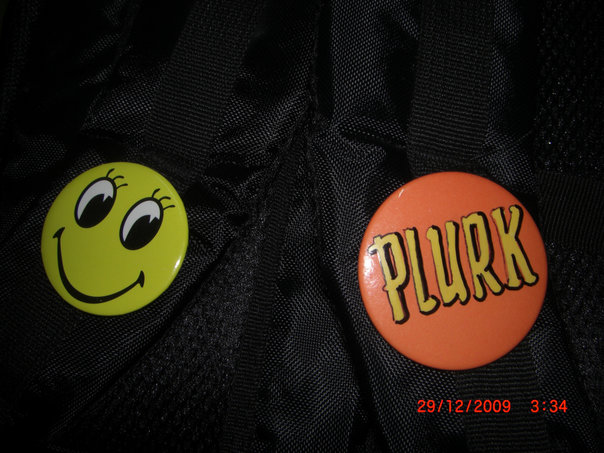
Before I go to QBM, I went to Komtar buy two badges, 1st badge is blogspot, and 2nd badge is plurk. I plan to buy facebook and friendster badge too. haha. Below picture shows the plurk badge I have:

He drove his MyV reach my house at 8.20p.m and we went long way to get Queensbay Mall at 8.35p.m. Then we went to Chicken Rice Shop to eat... two of her didn't eat. Only I and him eat the food. LOL.
After finish eating, we direct to see the concert. Below is the pictures and video about the concert:


Above video shows we were counting down 20 Sec for New Year!
Above video shows The Fire Works after finish count down 20 second! We standing there see the 15 minutes fire works! Wow!
Above video shows Tank is singing on the stage.
Above video shows each of the singers on the stage make a wish for coming year 2010.
After finish watching concert, we went to eat breakfast at 2p.m... omg. Then he fetch the female friend go home 1st, then baru fetch I and my sister go home.
I wondering why Queensbay Mall so big but none of them is wearing big headset? Only me 1 people is wearing there. They keep looking at me like... omg~ alien~ weirdo~ Below picture show how I wear this big headset to QBM, I listen to mp3 all the ways when walking. And I take down the headset, hang it on my neck when I am not listening. It is normal, don't know why Penang people feel it is abnormal @.@

Before I go to QBM, I went to Komtar buy two badges, 1st badge is blogspot, and 2nd badge is plurk. I plan to buy facebook and friendster badge too. haha. Below picture shows the plurk badge I have:
Langganan:
Komentar (Atom)