Tampilkan postingan dengan label Jailbreak Iphone. Tampilkan semua postingan

Selasa, 26 April 2011

iPad 2 Jailbreak 4.3.2 / 4.3.1 / 4.3 New Updates

Good news for iPad 2 users, few hours ago, veeence -which considered as a trusted source for jailbreak news- has announced that iPad 2 jailbreak is almost developed. According to veeence sources, iPad 2 jailbreak will be based on userland exploit which means that we will get something like JailbreakME which will be able to jailbreak iPad 2 running iOS 4.3.2 / 4.3.1 / 4.3.


Apparently an A5 (iPad2) jailbreak is almost developed. There's no release plan tho. What you get when security researchers investigate...
darkus6: so it's bootROM level, rigth? And which security researchers
Veeence: very likely userland. @i0n1c & @msuiche
Gamal_Sabry: will this support 4.3.2 ?
Veeence:yea, almost sure.
Sure you asking now about when iPad 2 jaiblreak released ? till now there is no ETA for iPad 2 jailbreak so we have to wait for the official word from iPhone dev-team. By the way, you have to know that Chronic-dev team is working now parellel with dev-team to jailbreak iPad 2 with Greenpois0n. Let's wait and see who will win this battle.

Note: If you have an iPad 2 running iOS 4.3 don't upgrade to upper version until official word from dev-team.


source

Jailbreak White iPhone 4 Now

After We showed you white iPhone 4 hands-on video, a Belgian user has just bought white iPhone 4, he just sent a screenshot showing that white iPhone 4 ruuning iOS 4.3.1. So, that seems good as white iPhone 4 owners will be able to jailbreak their devices.


You can jailbreak your white iPhone 4 by following this guide for Windows/Mac or this guide for Mac.

viageohot

Minggu, 24 April 2011

Unlock iPhone 4.3.2 with Ultrasn0w 1.2.2

The iPhone Dev Team today has released an updated version of Ultrasn0w unlock to make it compatible with iOS 4.3.2 on iPhone 4 and 3GS, running on the old baseband.
It should be noted though that this release of Ultrasn0w is not a new unlock for iPhones with newer basebands, instead, it only fixes the compatibility issues on the existing devices, which are jailbroken (with preserved basebands: 01.59.00 / 04.26.08 / 05.11.07 / 05.12.01 / 05.13.04 / 06.15.00) on iOS 4.3.2 using PwnageTool 4.3.2 or Sn0wbreeze 2.6.
For iPhone 3GS Only: How to Update iPhone 3GS to 06.15.00 Baseband for Unlock: Ultrasn0w 1.2.x unlocking requires that your iPhone 3GS is jailbroken with 06.15.00 baseband. Follow the complete guide posted here (with PwnageTool) or here (for Redsn0w) to update your iPhone 3GS baseband to 06.15.00 and jailbreak it on iOS 4.1 / 4.2.1 before proceeding with the following steps.
Note: Updating iPhone 3GS baseband to iPad’s 06.15.00 might result in loss of GPS functionality.
Step 1: First up, you will have to jailbreak your iPhone 4 or 3GS on iOS 4.3.2 and preserve the old baseband using either PwnageTool on Mac, or Sn0wbreeze on Windows. Instructions on how to jailbreak iOS 4.3.2 using PwnageTool can be found here, and for Sn0wbreeze can be found here.
Step 2: Once you are done with the jailbreak, you can now unlock your iPhone on the supported basebands using Ultrasn0w 1.2.2 from Cydia. To do this:
  • Start “Cydia” on your iPhone.
  • Touch on “Manage” tab on the bottom.
  • Now touch on “Sources” as seen in the screenshot below:
4.2.1 Unlock
  • Touch on “Edit” and then on “Add”. You will be prompted to enter a url source as seen in the screenshot below. Type “http://repo666.ultrasn0w.com” and touch on“Add Source” to add this repo if you haven’t already.
4.2.1 Unlock (1)
Cydia will now automatically update your sources by following a series of automated steps.
  • After installation is completed. Search for “ultrasn0w 1.2.2” in Cydia and install this application. This app will automatically unlock your iPhone so that you can use it with any carrier.
Ultrasn0w 1.2.2
Step 3: Now simply restart your iPhone and voila! you should now have a fully unlocked iPhone 4 or 3GS, running iOS 4.3.2 !
You can follow us on Twitter or join our Facebook fanpage to keep yourself updated on all the latest iPhone jailbreaking and unlocking releases.

source

How to Jailbreak iOS 4.3.2 PwnageTool 4.3.2 on iPhone 4, 3GS, iPod Touch 4G, 3G, iPad Untethered

PwnageTool 4.3.2 has released to to untethered jailbreak \iOS 4.3.2 to iPhone 4, 3GS, iPod Touch 4G, 3G, iPad 1 and AppleTV. As you now Redsn0w 0.9.6rc14 can do the same, but PwnageTool 4.3.2 allow who rely on unlock to keep their old unlockable baseband on iOS 4.3.2 so that they can use ultrasn0w to unlock their devices.

Supported devices:
  • iPhone 4, 3GS
  • iPod Touch 4G, 3G
  • iPad 1 (iPad 2 not supported)
  • Apple TV 2G.
Downloads:
Step 1: Run PwnageTool in “Expert mode” and then select the device you want to jailbreak.

Step 2: Browse for iOS 4.3.2 IPSW firmware for your device.
Step 3: Click on“Build” -as shown in the below screenshot- to start creating custom 4.3.2 firmware file 
Step 4: PwnageTool will now start building your custom 4.3.2 .ipsw file for your device
Step 5: Now follow the following steps to enter DFU mode using PwnageTool:
  • Hold Power and Home buttons for 10 seconds
  • Now release the Power button but continue holding the Home button for 10 more seconds
  • You device should now be in DFU mode
Step 5: Now restore your device to your pre-jailbroken custom 4.3.2 .ipsw files by doing this:
  • Start iTunes.
  • Click on your device icon from the sidebar in iTunes. 
  • Press and hold left “alt” (option) button on Mac, or Left “Shift” button if you are on Windows on the keyboard and then click on “Restore” button in the iTunes and then release this button.
Now iTunes asking you to select the location for your custom firmware 4.3.2 file. Select the pre-jailbroken custom 4.3.2 firmware .ipsw file, then click on “Open”.

Step 9: iTunes will now restore the firmware on your iOS device. (this will take 10 minutes) then enjoy your untethered jailbreak on iOS 4.3.2

Unlock iPhone 3GS, iPhone 4 on iOS 4.3.2:
You can follow this guide to unlock your iPhone 4, 3G running jailbroken iOS 4.3.2

Looking for Windows jailbreak for iOS 4.3.2? you can follow our guide posted here (Redsn0w 0.9.6rc14) or posted here (sn0wbreeze 2.6) to get untethered jailbreak iOS 4.3.2
 

Kamis, 21 April 2011

Custom iOS 4.3.2 Firmware Jailbroken - Activated for iPhone / iPod Touch / iPad [Download Direct Links]

If you can jailbreak your iPhone 4G, 3GS, iPod touch 4G, 3G or iPad on iOS 4.3.2. Here's a pre-jailbroken Custom iOS 4.3.2 IPSW firmware (untethered) and Activated using Sn0wbreeze 2.6 for iPhone 4, iPhone 3GS, iPad 1, iPod touch 4G, 3G.


Important Note: If you update to 6.15.00, you may lose your GPS,

iPhone 4
  • Download iPhone 4 iOS 4.3.2 Custom ipsw firmware untethered - Activated ( for users who are not on official carrier SIM card)
  • Dwonload iPhone 4 iOS 4.3.2 Custom ipsw firmware  untethered - Unactivated (for users who are on official carrier SIM card)
iPhone 3GS New Bootrom
  • Download iPhone 3GS new bootrom iOS 4.3.2 Custom ipsw  firmware untethered - Activated ( for users who are not on official carrier SIM card)
  • Download iPhone 3GS new bootrom iOS 4.3.2 Custom ipsw firmware  untethered - unactivated (for users who are on official carrier SIM card)
  • Download iPhone 3GS new bootrom iOS 4.3.2 Custom ipsw  firmware untethered Baseband 6.15.00 - Activated ( for users who are not on official carrier SIM card)
  • Download iPhone 3GS new bootrom iOS 4.3.2 Custom ipsw firmware  untethered Baseband 6.15.00 - unactivated (for users who are on official carrier SIM card)

iPhone 3GS Old Bootrom
  • Download iPhone 3GS old bootrom iOS 4.3.2 Custom ipsw  firmware untethered - Activated ( for users who are not on official carrier SIM card)
  • Download iPhone 3GS old bootom  iOS 4.3.2 Custom ipsw firmware  untethered - unactivated (for users who are on official carrier SIM card)
  • Download iPhone 3GS old bootrom iOS 4.3.2 Custom ipsw  firmware untethered Baseband 6.15.00 - Activated ( for users who are not on official carrier SIM card)
  • Download iPhone 3GS old bootrom iOS 4.3.2 Custom ipsw firmware  untethered Baseband 6.15.00 - unactivated (for users who are on official carrier SIM card)

iPad 1 (first generation)
  • Download iPad 1 iOS 4.3.2 Custom ipsw firmware untethered
iPod Touch 4G:
  • Download iPod Touch 4G iOS 4.3.2 Custom ipsw firmware untethered
iPod Touch 3G:
  • Download iPod Touch 3G iOS 4.3.2 Custom ipsw firmware untethered

How to Fix Error 3194:

  • Close TinyUmbrella.
  • Remove Cydia's SHSH caching server from your hosts (C:\WINDOWS\system32\driver\etc\hosts)
  • Reboot.
[Thanks]

Rabu, 20 April 2011

Apple has Blocked Saurik’s SHSH Servers [Updated]

We’ve all been watching as the fight between Apple and jailbreakers heats up. What started as a cat and mouse game has become more of a battle. Apple has certainly become more aggressive in the fight during the last few months.
For starters, they recently implemented ASLR as a security measure to thwart hackers. They have also blocked Cydia access from inside their retail stores, and pressured Toyota into removing their advertisements from the jailbreak community. What’s their latest move?
Chpwn announced via Twitter today that Apple has blocked Saurik’s SHSH servers. For those who aren’t familiar with SHSH blobs, they are necessary if you ever wanted to downgrade your iOS firmware.
UPDATE: It seems that Saurik noticed all the attention his downed SHSH servers were getting and decided to chime in. A few moments ago he tweeted that the server issue of saving new blobs was due to a code snafu, and not to Apple intervention.
Saurik had innovated a way to cache SHSH blobs for Cydia users. A simple file edit meant that users wouldn’t have to constantly remember to save their SHSH blobs with 3rd party software.
Well it seems Apple has blocked access to their gs.apple.com server, which Saurik’s SHSH servers needed to function properly. Chpwn does mention that currently saved SHSH blobs are fine and usable, but moving forward users should find a different method.
The fix is simple here. Those of you that have been using TinyUmbrella or iSHSHit can continue to do so. Chpwn also mentions that a “Submit my SHSH” could be on the way to Cydia to allow blobs to be saved locally and then uploaded to Cydia from the device.
Although this isn’t devastating news for most of us, it does send the message that Apple is taking jailbreaking a little more seriously. It’ll be interesting to see how Apple addresses jailbreaking both publicly and in iOS in the coming months.
What do you think?

via

How to Jailbreak Untethered iOS 4.3.2 with Sn0wbreeze 2.6 - iPhone 4, 3GS, iPod Touch 4G, 3G, iPad (Windows Guide)

iH8sn0w, the guy behind Sn0wbreeze jailbreak (aka PwnageTool for Windows) has released Sn0wbreeze 2.6  to untethered jailbreak iOS 4.3.2 on iPhone 4, iPhone 3GS, iPod touch 4G, 3G and iPad via a pre-jaibreak custom firmware.


Who rely on unlock should use Sn0wbreeze not Redsn0w , Why ? Sn0wbreeze 2.6 allows you to jailbreak untethered iOS 4.3.2 with preserving old (unlockable) baseband for iPhone 4, 3GS  to unlock it with the currecnt version of ultrasn0w.


Step 1: Start Sn0wbreeze, click the next “blue” colored arrow to proceed.

Step 2: Select the required firmware .ipsw file for your iOS device by clicking on the “Browse” button.

Step 3: Sn0wbreeze will now identify the selected IPSW file. Once done, click the next “blue” colored arrow to proceed.
Step 4: Now select the “Expert Mode”, followed by “Build IPSW” option to start creating your custom firmware.


Step 5: Sn0wbreeze will greet you with the following “Done!” message when the custom firmware has been successfully created.

Step 6: Now follow the onscreen steps to enter DFU mode using Sn0wbreeze:

  • Hold Power and Home buttons for 10 seconds
  • Now release the Power button but continue holding the Home button for 10 more seconds
  • You device should now be in DFU mode

If you have followed the steps correctly, you will get the following message from Snw0breeze

Step 7: Start iTunes, click on your iOS device icon from the sidebar in iTunes. Now press and hold Left “Shift” button on the keyboard and then click on “Restore” (Not “Update” or “Check for Update”) button in iTunes and then release this button.

This will make iTunes prompt you to select the location for your custom firmware 4.3.2 file. Select the required custom .ipsw file that you created above, and click on “Open”.

Step 8: Now sit back and enjoy as iTunes does the rest for you. This will involve a series of automated steps. Be patient at this stage and don’t do anything silly. Just wait while iTunes installs the new firmware 4.3.2 on your iOS device. Your iOS device screen at this point will be showing a progress bar indicating installation progress. After the installation is done, your iOS device will be jailbroken on iOS 4.3.2.


Download Sn0wbreeze 2.6 for Windows.
Download iOS 4.3.2 for iPhone,  iPod touch, iPad
Download iTunes 10.2.2

How to Jailbreak 4.3.2 Untethered iPhone 4, 3GS, iPod Touch 4G, 3G, iPad with Redsn0w 0.9.6rc14 - Windows / Mac

The iPhone Dev Team has just released Redsn0w 0.9.6rc14 to jailbreak iOS 4.3.2 untethered using the same exploit used to untether iOS 4.3.1.


Step 1: Download iOS 4.3.2 for iPhone, iPad or iPod touch from here.

Step 2: Restore to iOS 4.3.2 in case you haven't yet using the IPSW file you just downloaded via iTunes 10.2.2.

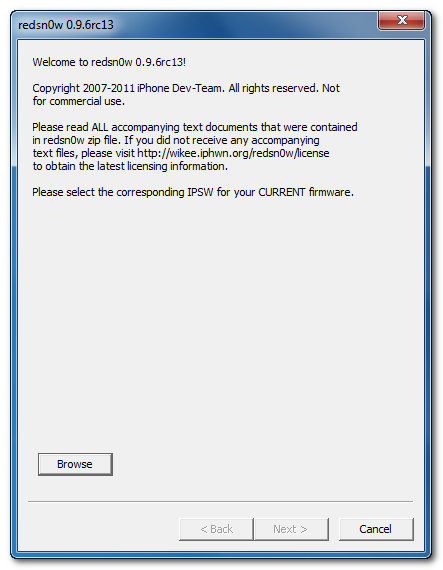
Step 3: Start Redsn0w and point it to the official iOS 4.3.2 firmware file.


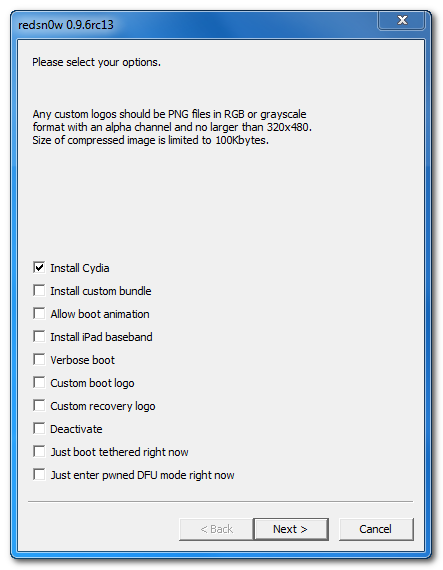
Step 4: Now select “Install Cydia” and click “Next”. Optionally (if available), you can also select any other option you like.


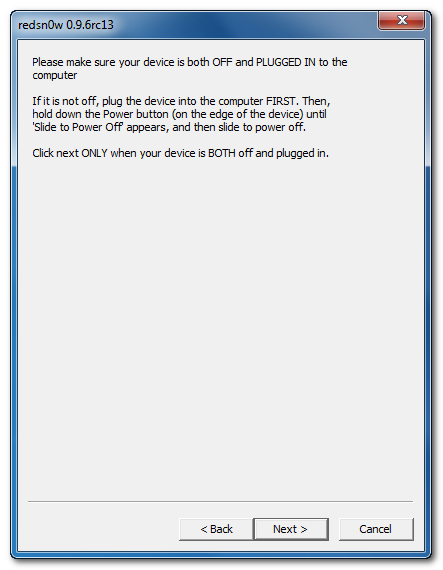
Step 5: Now make sure your device is both OFF and PLUGGED IN to the computer before you click “Next”.


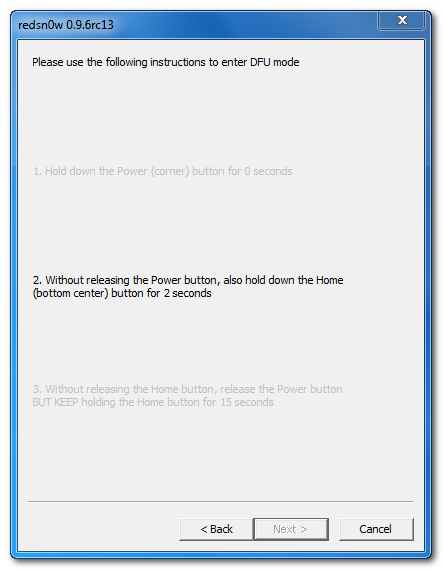
At this stage you will be presented with a screen where you will be guided on how to enter DFU mode. Quickly hold “Power” button and then while holding the “Power” button, you will now have to hold “Home” button too. Now after few seconds release “Power” button but keep holding “Home” button until installation begins.


Step 6: Wait until you get untethered iOS 4.3.2 jailbroken in few minutes.

Download Redsn0w 0.9.6rc14 for Windows
Download Redsn0w 0.9.6rc14 for Mac
Download iTunes 10.2.2

[viaGeohot]

Selasa, 19 April 2011

Dev team releases Jailbreak for iPhone iOS 4.3.2 !!

Only a few weeks after the 4.3.1 untether created by @i0n1c was released, Apple pushed out firmware 4.3.2. Thankfully, it appears Apple didn’t have a chance to fix the hole used by @i0n1c’s untether, so he ported his code over to 4.3.2’s kernel.  Today’s redsn0w has been updated to include it.
The 4.3.2 untether works on all devices that actually support 4.3.2 except for the iPad2:
  • iPhone3GS
  • iPhone4 (GSM)  
  • iPod touch 3G
  • iPod touch 4G
  • iPad1
redsn0w 0.9.6rc14:
As always, ultrasn0w unlockers should stay away from redsn0w and only update their firmware through a custom IPSW.  We’ll release a new version of PwnageTool sometime this week.


how to jailbreak


original link

How to Jailbreak iOS 4.3.2 on iPhone / iPod Touch / Pad using Redsn0w 0.9.6rc12 [Video]

Last week we showed you full step by step guide to jailbreak iOS 4.3.2 with Redsn0w 0.9.6rc12 on iPhone 4, iPhone 3GS, iPod touch 4G, iPod touch 3G and iPad. For who don't know, iOS 4.3.2 still exploitable with i0n1c's untethered exploit. This is still tethered jailbreak so far,  which means that you will have to boot your iOS device in tethered state every reboot.


Mac user ? you can follow this guide to jailbreak iOS 4.3.2 using PwnageTool

Senin, 18 April 2011

This Case Unlock iPhone 4 and Run Two SIM cards at Same Time

RebelSimcard.com has announced new revolutionary device, the new device called "Rebel 2Phone Dual Standby Sim Case" for iPhone 4 that allows you to run two SIM cards together (two carriers) at the same time. You will be able to receive calls simultaneously on your device.

How it works?  You only have to insert the second micro SIM into a mini SIM adapter. Next step is to jailbreak your iPhone 4 and install the Rebel 2Phone iPhone application. Now you will find both SIM cards active and you can see signal and battery levels at the top of the screen of your iPhone 4


Benefits for Active Rebel 2Phone Dual Sim for iPhone 4
  • Active Dual-SIM operation allows the use of two services without the need to carry two phones at the same time.
  • Using multiple SIM cards allows the user to take advantage of different pricing plans for calls and text messages to certain destinations as well as mobile data usage.
  • You can use more 2 sim card on your iPhone 4 to make and receive calls simultaneously. This is true standby.
  • Rebel 2Phone has its own GSM phone(use iPhone 4 screen mic speaker etc.) built into our own case, hence, you can receive call simultaneously. This is true dual standby.
  • Built-in 1700mAh Battery. This battery is used to power the phone in our case or can you be used as a power extender for your iPhone Battery.
  • If you run low on battery on your iPhone you can use the battery from the Rebel 2Phone Case to charge your iPhone.
  • Does not use any power from your iPhone. Has it own built-in battery that power the active dual sim.
  • Prevent your iPhone 4 from scratches.
  • Make Calls with even Locked iPhones. Dont be stuck using your iPhone 4 as an iPod.
Rebel 2Phone Protective case With the technology of piano surface painting and UV antiwear property, specific details of this item offers no significant bits of plastic bond. The overall coating design style offers your iphone better protection from bumps & scratching.This model is only 0.7mm in thickness which will not make a siginificant plus to your phone.
Specifications
  • GSM double band 900/1800 850/1900
  • Battery: 3.7V/800mAh
  • Talk Time: 500min. Standby Time: 288h
  • Input/Output: 5.0V/500MA
  • Dimension: 126(L)*61.8(W)*16.3(D)mm
  • Weight: Approx. 59g
Features
  • Perfect protect iPhone as a case
  • Offer battery to charge the iPhone as a power case
  • Put 2 phones in one iPhone 4 and make it dual sim card dual standby
  • Compact and fashionable design
  • Great Saving when your travel and make calls with local country simcards or roaming simcards.


  [viageohot]

Jumat, 15 April 2011

Resn0w 0.9.6rc13 to Bring Untethered 4.3.2 Jailbreak Soon

Some exciting news about  iOS 4.3.2 untethered jailbreak. Few minute ago the well know iPhone hacker i0n1c has just confimred -via his Twitter- that Apple didn't patch his untethered exploit which brings unthered jailbreak for iOS 4.3.2 on iPhone 4, iPhone 3GS, iPod touch 4G, iPod touch 3G, iPad and Apple TV 2G.


I won’t be able to create all the untether binaries before sunday, because I will be on planes, …
Does that mean that we can use the current Reds0w 0.9.6rc12 and PwnageTool 4.3? Of course NO, as i0n1c mentioned above that he will develop his unterhed jailbreak so we expect to see Redsn0w 0.9.6rc13 and new built of PwnageTool 4.3.

Expected date to released iOS 4.3.2 untethered jailbreak ? i0n1c did not announce certain date for untethered iOS 4.3.2 jailbreak, but I highly expect to see it by the next weekend.
 

How to Jailbreak iOS 4.3.2 Redsn0w 0.9.6rc12 - iPhone / iPod Touch / iPad - Windows / Mac [Guide]

Now it's confirmed that the curent version of Redsn0w 0.9.6rc12 (Windows / Mac) can jailbreak (tethered) iOS 4.3.2 on iPhone 4, iPhone 3GS, iPod touch 4G, iPod touch 3G and iPad.


Unfortunately, you have to now that is still a tethered jailbreak which means that you will have to boot your iOS device in tethered state every reboot.

NOTE: Users who rely on ultrasn0w unlock MUST stay away from Redsn0w.

Step 1: Download iOS 4.3.2 and iOS 4.3.1 (required by Redsn0w 0.9.6 for 4.3.2 jailbreak) for your version of iOS device. (download links at the end)
Step 2: Update/Restore to iOS 4.3.2 firmware using the IPSW file via iTunes 10.2.1.
Step 3: Start Redsn0w and point it to the official iOS 4.3.1 firmware file (Not iOS 4.3.2).


Step 4: Now simply select “Install Cydia” and click “Next”.
Step 5: Now make sure your device is both OFF and PLUGGED IN to the computer before you click “Next”.
 
At this stage you will be presented with a screen where you will be guided on how to enter DFU mode. Quickly hold “Power” button and then while holding the “Power” button, you will now have to hold “Home” button too. Now after few seconds release “Power” button but keep holding “Home” button until installation begins.


Step 6: Wait shortly. Once done, your iPhone, iPad or iPod touch will restart automatically and you will find it fully jailbroken (untethered) on the latest iOS 4.3.1 firmware.

Download Redsn0w 0.9.6rc12 (Windows)
Download Redsn0w 0.9.6rc12 (Mac)
Download iOS 4.3.1 for all iPhone, iPod touch, iPad and Apple TV 2G
Download iOS 4.3.2 for all iPhone, iPod touch, iPad and Apple TV 2G
Download iTunes 10.2.1 for Windows / Mac OS X


source

Senin, 11 April 2011

Enable Multitouch Gestures iPhone / iPod Touch / iPad on iOS 4.3.1

Now you can enable -the amazing feature- multitouch gestures on your iPhone 4, 3GS , iPod Touch 4G, 3G and iPad on the newly iOS 4.3.1. New jailbreak tweak called MT Gestures allows you to enable multitouch gestures on your iPhone, iPod touch and iPad on iOS 4.3.1. Simply install MT Gestures tweak on your jailbroken iPhone, iPod touch and iPad then enable it in winterboard.


You should note that MT Gestures tweak will not add any new icon on the springboard of your iPhone. A new toggle will appear in the Settings.app of your iOS device. Simply go to Settings.app to configure this tweak. MT Gestures is available in Cydia under ModMyi repo.


You MUST have jailbroken device on iOS 4.3.1 or above you can follow this guide (Redsn0w for Windows / Mac) , this guide (PwnageTool for Mac) or this guide (Sn0wbreeze for Windows) .


source

New virus for iOS 4.x spreads on the web May Damage your iPhone (WARNING)

We received this information this morning and released it immediately. Send this alert to everyone you know!

The distribution of the destructive virus happens with a App from internet pages about Fake Jailbreak presentation called: “UNLOCK NOW FREE”. DON’T go to this page from iOS device (iPhone, iPad, iPod touch), if you do this, however, you’ll see -10-15 seconds of an animation followed by the text: “DOWNLOAD UNLOCK 2 NOW FREE”. Then it’s already too late and your information will be cleared (SIM and idevice information).


If you search information about Jailbreak or Unlock for iPhone or iPad –> search this information from Mac or PC, but don’t do it this from iOS device.

To stop this virus it is necessary to inform all internet users as soon as possible so this virus gets NO chance to survive…

source

Sabtu, 09 April 2011

Ultrasn0w 1.2.1 Unlock iPhone 4 / 3GS iOS 4.3.1 to be Released Today

Want to unlock your iPhone on iOS 4.3.1, Well, MuscleNerd has uploaded a screenshot of ultrasn0w 1.2.1 which brings support for iOS 4.3.1 jailbroken iPhone 4, 3GS with old basebands. Some users has used ultrasn0w fixer but still have some bugs as they noticed a single signal bar.


Ultrasn0w 1.2.1 fix all these bugs. But you have to know that ultrasn0w 1.2.1 isn't a new unlock, it will allow users to unlock iPhone 4, 3GS on these basebands only (04.26.08, 05.11.07, 05.12.01, 05.13.04, 06.15.00, and 01.59.00).

So who relies on ultrasn0w unlock and want to jailbreak his device on iOS 4.3.1, he MUST use PwnageTool 4.3 (Mac) or Sn0wbreeze 2.5 (Windows) to preserve their unlockable baseband while upgrading to iOS 4.3.1.
[machackpc]