You don't need to correct the codes of Adsense if you add the codes onto the side-bar on your blog since the side-bar is using HTML/Javascript which is not allow xml.
But if you go to Dashboard > Design > Edit HTML (This HTML editor allows xml), you need to modify the codes of Adsense :
1) Change & into &
2) Change < into <
3) Change > into >
4) Change " into "
5) Change ' into '
For example, the blue codes below is original codes of Adsense, and the yellow codes below is what I have after changed all the symbols :
<script type="text/javascript"><!--
google_ad_client = "pub-0690220431785051";
/* 728x90, created 8/7/10 */
google_ad_slot = "8652075993";
google_ad_width = 728;
google_ad_height = 90;
//-->
</script>
<script type="text/javascript"
src="http://pagead2.googlesyndication.com/pagead/show_ads.js">
</script>
<script type="text/javascript"><!--
google_ad_client = "pub-0690220431785051";
/* 728x90, created 8/7/10 */
google_ad_slot = "8652075993";
google_ad_width = 728;
google_ad_height = 90;
//-->
</script>
<script type="text/javascript"
src="http://pagead2.googlesyndication.com/pagead/show_ads.js">
</script>
Please double check to make sure you have changed all the symbols on the codes already, if you are lazy to change the codes by yourself, you can always use the tool on this page to help you change the code : http://blogcrowds.com/resources/parse_html.php.
You might also like this : http://ye5.blogspot.com/2010/12/how-to-use-google-adsense.html
Tampilkan postingan dengan label Blogspot. Tampilkan semua postingan
Tampilkan postingan dengan label Blogspot. Tampilkan semua postingan
Selasa, 15 Februari 2011

Sabtu, 25 Desember 2010
How To Write A Good Blog Post.
Your good posts get ignored?
Why people don't like to read your post? How to solve it? As long as your post is fulfilling the 7 conditions below, people will like to read your post.
1. Don't use "I", please use "You".
One unsavory quirk about human beings is that we instinctively focus on ourselves first. This means that your visitors immediately start scouring your blog for posts that mean something to them. If you start your post with:
“I just spent the day washing my kitchen floor.”
…your readers will ignore it. After all, the post is about YOU and YOUR kitchen floor and not about them.
Try this instead: Start your posts with a statement or question that uses the second-person perspective:
“Do you hate washing your kitchen floor? Is a mop the last thing on Earth you want to hold in your hand?”
See what I mean?
2. A focus on solving problems
Human beings are natural-born problem solvers. From the moment we wake-up to when we lay down to sleep we are finding answers to problems. Your readers will adore you if you can solve a problem that has been haunting them. Work hard to find these solutions and offer them often.
On the other hand, if your blog posts are getting ignored, it’s likely that you are solving your own problems and not your readers.
Give this a try: take out a sheet of paper and write down 11 big problems that keep your readers up at night. Now think of five posts that you can write for each of those problems. Sit back and look at your list of 55 blog posts. That looks like a solid editorial calendar for 2011, doesn’t it?
3. One idea per post
Research has shown that most people can’t hold more than one or two ideas in their head at one time. The more ideas you try to stuff in, the more likely you are going to get ignored.
Focusing on one idea is a sure-fire way to immediately boost the punching power of your post. If you have more than one then consider writing a series of posts. But, whatever you do, don’t shoehorn a thesis into your post. That’s a certain recipe for obscurity.
4. Excellent packaging
You know what? Blogging is a visual game. If your post is packaged well, it will get read. I’m sure you’ve found yourself reading a poorly written post wrapped in a great package! So, at least spend a little extra time to clean up look and feel.
A few pointers: use short paragraphs and one-line sentences to make your paragraphs visually interesting. Add mini-headlines throughout your post to help people who skim before they read. Last, find a picture (preferably of people) that grabs attention and helps tell your post’s story.
5. Down-to-earth practicality
Blog readers are a practical bunch. Like you, they want to be able to use what they learn. That means, they absolutely hate Ph.D. dissertations in blog-post clothing. Dense, fact-laden, verbose, diatribes repel readers and get ignored. Save this document for the place where it belongs: in an academic journal.
On the other hand, work to place relevant and practical information in each post. Your goal should be to illustrate your point in simple how-to pieces. Not only will people thank you in the comments, but they will also share your content.
6. Careful research
I’ve made the mistake of thinking that my readers shared my interests. I was wrong. The ghost town around my blog post provided all the proof I needed.
Research is the process of pinpointing what interests your readers. These days, research is pretty simple to do. You can simply ask for topics on Twitter, do a Google search with your topic and the word “help”, hang out in online forums, or survey your own readers.
Once you get the research right, you’ll soon be perceived as the go-to person in your niche. You’ll have the answers and your posts will attract eager readers by the bushel. Trust me. (By the way, if you are competing in a competitive niche, research is the number one way to get an advantage)
7. Rapport
When I started writing professionally, a mentor told me to write as if my reader was sitting on the bar stool beside me. That advice has been worth a fortune to me.
The best way to build this type rapport is to write with your natural voice. You know, the voice you use when you talk to yourself in the shower. The voice you use when you want to say something snarky but think better of it. Yep, that voice.
Once you start using it, your posts will stick in the minds of your readers. Lurkers start commenting and people start sharing. Got it?
Why people don't like to read your post? How to solve it? As long as your post is fulfilling the 7 conditions below, people will like to read your post.
1. Don't use "I", please use "You".
One unsavory quirk about human beings is that we instinctively focus on ourselves first. This means that your visitors immediately start scouring your blog for posts that mean something to them. If you start your post with:
“I just spent the day washing my kitchen floor.”
…your readers will ignore it. After all, the post is about YOU and YOUR kitchen floor and not about them.
Try this instead: Start your posts with a statement or question that uses the second-person perspective:
“Do you hate washing your kitchen floor? Is a mop the last thing on Earth you want to hold in your hand?”
See what I mean?
2. A focus on solving problems
Human beings are natural-born problem solvers. From the moment we wake-up to when we lay down to sleep we are finding answers to problems. Your readers will adore you if you can solve a problem that has been haunting them. Work hard to find these solutions and offer them often.
On the other hand, if your blog posts are getting ignored, it’s likely that you are solving your own problems and not your readers.
Give this a try: take out a sheet of paper and write down 11 big problems that keep your readers up at night. Now think of five posts that you can write for each of those problems. Sit back and look at your list of 55 blog posts. That looks like a solid editorial calendar for 2011, doesn’t it?
3. One idea per post
Research has shown that most people can’t hold more than one or two ideas in their head at one time. The more ideas you try to stuff in, the more likely you are going to get ignored.
Focusing on one idea is a sure-fire way to immediately boost the punching power of your post. If you have more than one then consider writing a series of posts. But, whatever you do, don’t shoehorn a thesis into your post. That’s a certain recipe for obscurity.
4. Excellent packaging
You know what? Blogging is a visual game. If your post is packaged well, it will get read. I’m sure you’ve found yourself reading a poorly written post wrapped in a great package! So, at least spend a little extra time to clean up look and feel.
A few pointers: use short paragraphs and one-line sentences to make your paragraphs visually interesting. Add mini-headlines throughout your post to help people who skim before they read. Last, find a picture (preferably of people) that grabs attention and helps tell your post’s story.
5. Down-to-earth practicality
Blog readers are a practical bunch. Like you, they want to be able to use what they learn. That means, they absolutely hate Ph.D. dissertations in blog-post clothing. Dense, fact-laden, verbose, diatribes repel readers and get ignored. Save this document for the place where it belongs: in an academic journal.
On the other hand, work to place relevant and practical information in each post. Your goal should be to illustrate your point in simple how-to pieces. Not only will people thank you in the comments, but they will also share your content.
6. Careful research
I’ve made the mistake of thinking that my readers shared my interests. I was wrong. The ghost town around my blog post provided all the proof I needed.
Research is the process of pinpointing what interests your readers. These days, research is pretty simple to do. You can simply ask for topics on Twitter, do a Google search with your topic and the word “help”, hang out in online forums, or survey your own readers.
Once you get the research right, you’ll soon be perceived as the go-to person in your niche. You’ll have the answers and your posts will attract eager readers by the bushel. Trust me. (By the way, if you are competing in a competitive niche, research is the number one way to get an advantage)
7. Rapport
When I started writing professionally, a mentor told me to write as if my reader was sitting on the bar stool beside me. That advice has been worth a fortune to me.
The best way to build this type rapport is to write with your natural voice. You know, the voice you use when you talk to yourself in the shower. The voice you use when you want to say something snarky but think better of it. Yep, that voice.
Once you start using it, your posts will stick in the minds of your readers. Lurkers start commenting and people start sharing. Got it?
Kamis, 09 Desember 2010
The Coolest Blogger Template
 I did a lot of customization on this blogspot template. I put a lot of affords and designs on this template. Now I decide to share this template to public. Picture below is the screen-shot of this blog template :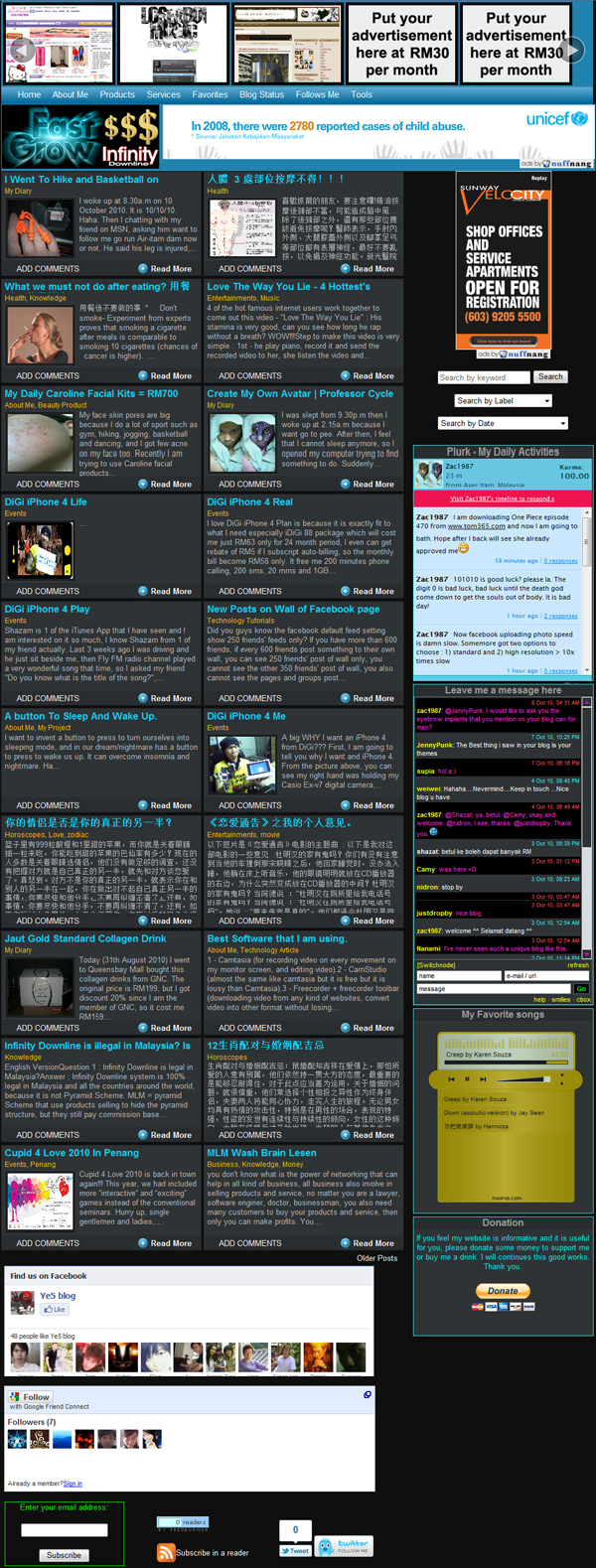
Demo at : http://2aek.blogspot.com.
You can download this template from : 2aek.com/inventory/2aekBlogspotTemplate.zip.
Instruction and Documentation :
1 - After you have download the zip file from 2aek.com/inventory/2aekBlogspotTemplate.zip, you can open it with winrar / winzip / 7zip software. Then drag out the 2aekBlogspotTemplate.xml file from the zip file to your desktop. Then you go to your blogspot dashboard click Design > Edit HTML > click "Browse" button > select 2aekBlogspotTemplate.xml > click "Upload" button > Click "Delete All Widgets".
2 - If you want to show many 21 posts on home page, you can go to your blogspot dashboard click Settings > Formatting > Change the field of "Show at most" to 21 Posts. If your blog fail to show 21 posts on your blog, you must need to read this : http://ye5.blogspot.com/2010/11/show-many-posts-on-main-page-of.html.
3 - If you want to change the pictures on the Top Slide Show, you can go to Design > Edit HTML > tick Expand Widget Templates. Then press Ctrl + f button on your keyboard search for the word . You will see the codes of picture link, website link, website name below few line of <!-- Myslides --> . The pictures size is 180px width and 130px height.
4 - If you want to change the Top Menu, you can go to Design > Edit HTML > tick Expand Widget Templates. Then press Ctrl + f button on your keyboard search for the word Home. You will see the website link and the website name after the word "Home".
5 - The right side bar has a lot of my own widgets like : Search, Plurk, Yahoo Ping Chatting Box, Ccbox, Blog Status and Donation. If you want to replace them with your own widgets, you can click the "X" button which is on right bottom corner on the widget to edit the code. If you want to remove the widget, you can click the "X" button which is on right bottom corner on the widget, then click "Remove" button.
6 - The Footer of the template has Facebook Like Box. If you want to replace it with your own Facebook Like Box. Please go to http://www.facebook.com login your facebook account. Then go to http://www.facebook.com/ye5blog. Scroll down the page and click "Create a Page For My Business" link on the left side bar. After you have finish creating your own facebook page, then you go to http://developers.facebook.com/docs/reference/plugins/like-box type in your facebook page url into the box, change width value to 678, change connection value to 24, uncheck "Show stream", click "Get Code", copy the codes from "iframe" box. Then you go your blogspot dashboard click Design > Edit HTML > tick Expand Widget Templates. Then press Ctrl + f button on your keyboard search for the word http://www.facebook.com/plugins/likebox.php. Delete the following codes : <iframe allowTransparency='true'......... height:270px;'/>, then paste your own Facebook page codes there.
7 - The Footer of the template has Google Friends Followers Gadget. If you want to replace it with your own Google Friends Followers Gadget, please follow the instruction on this page : http://ye5.blogspot.com/2009/12/add-follower-gadget-on-post-on-blogspot.html. After you copy the code, where should you paste the code? You go to your blogspot dashboard click Design > Edit HTML > tick Expand Widget Templates. Then press Ctrl + f button on your keyboard search for the word <!-- Include the Google Friend. Delete the following codes : <!-- Include the Google Friend Connect javascript ............. skin); </script/>, then paste your own Google Friends Followers Gadget codes there.
8 - The footer of the template has 3 FeedBurner Subscription gadgets : Email subscription gagets, reader number display gadget, and subscription in reader gadget. You can get this 3 FeedBurner Subscription gadgets from http://feedburner.google.com. You just need to type in your blog url into the box, then click "Next" button many times until finish all the "Next" buttons, then click "Publicize" on top menu, then scroll down the page and copy the codes, paste the codes onto a notepad first. Then you can click on "Email Subscriptions" from left side menu, activate it, then copy the codes on the first box, paste the codes onto a notepad first. Then you go to your blogspot dashboard click Design > Edit HTML > tick Expand Widget Templates. Then press Ctrl + f button on your keyboard search for the word feedburner, replace the codes of feedburner gadgets with the codes on your notepad just now.
If you have any problem or question regarding this template, please post comment by using the form below.
Sabtu, 13 November 2010
Show many posts on main page of blogspot
 Blogger uses pagination feature to limit the numbers of post displaying on our blog main page, it can help blogger server saves million of hours of page loading time per week (saving the bandwidth).
Normally if your post has more than 15 pictures, the main page of your blog will display 1 post only, your main page will not display 2 posts, because the 1st post already has too many pictures, so if you want to display 20 posts on main page, how? It is simple, you just need to display 1 picture on each post on main page, then add a link "Read More" link on each post. So the visitor just can see there is only 1 picture on the post and if the visitor want to see all the pictures, he can click "Read More" button. A good example is : http://ye5.blogspot.com which success displays 17 posts on main page.
How to make main page display only 1 picture on each post? Simple!!! You just need to add the code <!--more--> after the code of 1st picture. Picture below show you the example :

After type the word <!--more--> on HTML page, then you can check the result by clicking "Compose" button like picture below :

Note that if there is 1 picture above <!--more-->, which mean there will be 1 picture shown on home/main page of your blog. Let's say you show 30 posts on your home/main page, if each of 30 posts has 1 big size picture, so you show a total 30 big size pictures on home/main page, it will cause the page loading speed very slow. So you better resize the the 1st picture of all 30 posts, so your home/main page will load 30 pieces of small size picture, it will faster the page loading speed. Please click here to learn how to resize the pictures on blog post.
Minggu, 27 Desember 2009
Add Follower Gadget on A Post on Blogspot
It is very easy to add Follower Gadget on the sidebar. But If you want to add the follower Gadget onto a post, for example: http://ye5.blogspot.com/2009/12/you-can-add-follow-me-here.html, the following steps guide you how to do that:
1. Goto www.google.com/friendconnect and on the left pane you will see a list of your blogs.
2. Expand your blog name(just click on it).
3. Click the big button "Add the members gadget".
4. You can customize the colours and the Generate the Code.
5. Copy this Code . Then, paste the code onto your blog post.
6. Now you should have that gadget running on your blog.
Happy.
1. Goto www.google.com/friendconnect and on the left pane you will see a list of your blogs.
2. Expand your blog name(just click on it).
3. Click the big button "Add the members gadget".
4. You can customize the colours and the Generate the Code.
5. Copy this Code . Then, paste the code onto your blog post.
6. Now you should have that gadget running on your blog.
Happy.
Langganan:
Komentar (Atom)